MeetingBar review (2026): is it any good?
Free Mac menu bar app that shows and joins your next meeting
MeetingBar report card
Good · out of 4.0 · graded Oct 10, 2026
Best for joining your next call from the Mac menu bar
MeetingBar sits in your Mac's menu bar, shows the next meeting with a countdown and joins it in one click, free and open source. It's a meeting launcher, not a calendar: the menu only lists today and tomorrow, and it reads only macOS Calendar or a direct Google connection. It's Mac only, needs macOS 12, and there's no paid support behind it.
Who MeetingBar is for
- Fits if your day is back-to-back video calls and you want one click to join
- Works for Mac users who want a countdown to the next meeting always in view
Who MeetingBar is not for
- Skip it if you're on Windows or want it on your phone, as it's Mac only, macOS 12 or later
- Too light for planning your week, because the menu lists today and tomorrow only
- Not for you if you want paid support behind the app, since it runs on donations
- Watch out: it reads only macOS Calendar or Google directly, so Exchange and Office 365 must go through Calendar.app
Why MeetingBar gets a 2.6
Five grades, each with its reason. The GPA is their average: an A is 4 points, an F is none.
- AValue for moneyFree and open source under Apache 2.0, where this category's middle plan is $6 a month. The App Store's $2.99, $5.99 and $11.99 patronage purchases are thank-yous, not unlocks.
- AFree plan and trialFree with every feature in, and no paid plan anywhere, so there's no wall to hit. The flip side is that there's no paid support either.
- DFeaturesThis is one narrow job, getting you into the call, and it can't work without a calendar app behind it: macOS Calendar or a direct Google connection. Inside that job it spots links for 50-plus services and joins by shortcut, but the menu shows today and tomorrow only.
- BEase of useNo rating on record, but nothing needs setting up: install from the App Store, Homebrew or GitHub and it reads the calendars your Mac already has, or hooks straight to Google Calendar.
- DPlatforms and integrationsOne operating system: Mac, needing macOS 12.0 or later, with no iPhone, Windows or web version. Exchange and Office 365 calendars have to come in through Calendar.app.
What these grades rest on. Graded from this listing, whose facts were read from MeetingBar's own site, its GitHub page and its Mac App Store listing on 9 October 2026. Also tested with a demo account on 2026-02-03. How we review and grade.
Make MeetingBar? Put this grade on your site

Paste this where you want the badge. It links here and follows the grade if it changes. About badges
<a href="https://toolgpa.com/tools/meetingbar#review"><img src="https://toolgpa.com/badge/meetingbar.svg" alt="MeetingBar: 2.6 GPA on ToolGPA" width="196" height="56"></a>Where MeetingBar stands among calendar and scheduling apps
MeetingBar's GPA of 2.6 is higher than 62 of the 114 other calendar and scheduling apps we grade, and level with 15.
It stands best on free plan and trial (A, above 94 of 114) and worst on features (D, above 0).
MeetingBar has no paid plan.
On features, ease of use and platforms it scores 1.7 out of 4. Nothing scores higher for less, though at least one tool matches that score at a lower price.
Each grade against the category
Every bar is all 115 calendar and scheduling apps we grade, cut by the letter each got. MeetingBar’s own letter is outlined.
- AValue for moneyAbove 79 of 114, level with 35
- AFree plan and trialAbove 94 of 114, level with 20
- DFeaturesAbove 0 of 114, level with 5
- BEase of useAbove 68 of 114, level with 33
- DPlatforms and integrationsAbove 0 of 114, level with 10
Price against what you get
Each dot is one of 100 calendar and scheduling apps. Further left costs less, and higher up scores better on features, ease of use and platforms. Point at a dot to see which tool it is.
Features, ease of use and platforms, averaged
What paid plans start at, a month (each step along is roughly double) →
- The best score at each price
- Has a free plan
- No free plan
Keep MeetingBar, or make your own?
Your call
A calendar at its plainest is events on a grid.
MeetingBar is free, so making your own saves no money. Make it only if you want it built your way.
What you could make
- Calendar: an app builder makes this well.
What you could not
- A native app living in the menu bar.
- A real app for macOS. Something home-made would be a web page.
- It plugs into other products, Google Calendar, Apple Calendar and Google Meet among them.
- Hooks into the device itself: Shortcuts.
What this rests on. MeetingBar’s listing: what it does, where it runs, what it plugs into and what it costs. It is a judgement about the kind of software this is. We have not built a replacement for it, and making your own means looking after it too. How we decide, and every tool’s verdict.
What is MeetingBar?
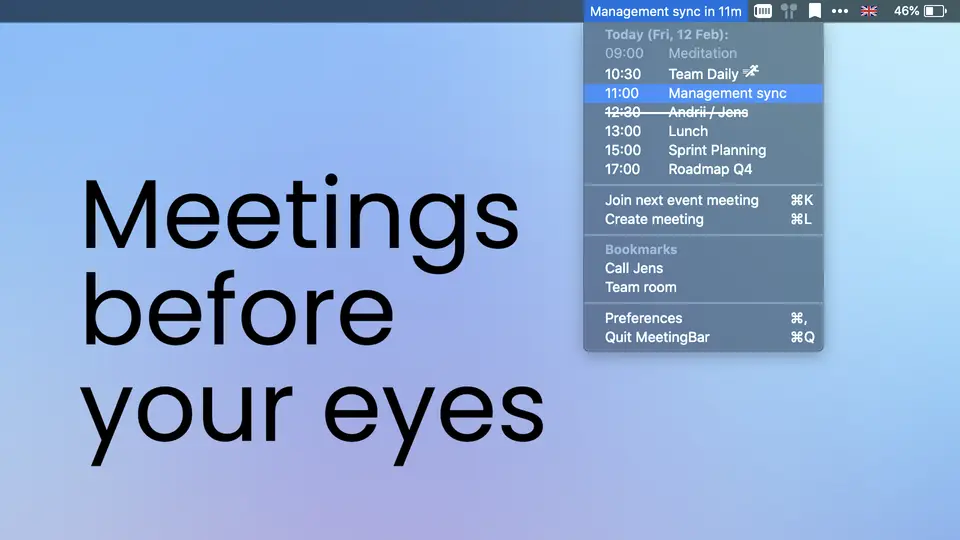
MeetingBar is a Mac menu bar app that shows the current or next meeting from your calendar and opens its video link in one click. It reads events from the macOS Calendar app or directly from Google Calendar, detects links for more than 50 meeting services, and can remind you with a notification or a full-screen alert. The app is free and open source under the Apache 2.0 license, and is funded by optional donations.
Worth knowing
- Mac only, and it requires macOS 12.0 or later.
- It is a meeting launcher more than a full calendar: the menu lists events from today and tomorrow only.
- Only two calendar sources are supported: the macOS Calendar app and a direct Google Calendar connection. Exchange and Office 365 go through Calendar.app.
- Development is community-supported through donations; there is no paid plan or paid support.
Key features
- Next meeting in the menu bar
- The status bar shows the current or next meeting with its title, time, countdown or service icon, and long titles can be shortened. The menu lists events from today and tomorrow.
- Join in one click or keystroke
- Join the current or next online meeting from the menu or with a global keyboard shortcut. Links can open in a chosen browser or in the service's own app, set per service.
- More than 50 meeting services
- Detects meeting links in calendar events for Google Meet, Zoom, Microsoft Teams, Webex, Discord, Jitsi, Slack Huddle, FaceTime and many others.
- Notifications and full-screen reminders
- Sends macOS notifications ahead of meetings and can show a full-screen reminder when one starts. All-day, declined, tentative, pending or linkless events can be filtered out.
- Create meetings and bookmarks
- Starts an ad-hoc meeting in your preferred meeting service, and keeps bookmarks for recurring meeting links so they can be opened quickly.
- Shortcuts and AppleScript
- Works with Apple Shortcuts and AppleScript, and can run a custom script when you join a meeting, for example to pause music. Raycast script commands are available.
MeetingBar pricing
As of Oct 9, 2026, MeetingBar is free to use.
- Starts at
- Free
- Free plan
- The whole app is free and open source. The Mac App Store lists optional patronage purchases of $2.99, $5.99 and $11.99 for 3, 6 and 12 months, and the project also takes Patreon and Buy Me a Coffee support.
- Free trial
- None listed
| Plan | Price | What you get |
|---|---|---|
| MeetingBar | $0 | Every feature, installed from the Mac App Store, Homebrew or a DMG from GitHub. The in-app patronage purchases are optional. |
Read from apps.apple.com on Oct 9, 2026. Prices change, so confirm with MeetingBar before you buy.
Works with
MeetingBar alternatives
- MeetingBar vs Dato
Free trial · from $18 one-time
- MeetingBar vs In Your Face
Free trial · from $3.99/mo
- MeetingBar vs Fantastical
Free plan · from $4.75/mo



Common questions
Does MeetingBar have an Android app?
No Android app was listed when its pages were read on Oct 9, 2026. MeetingBar is listed for macOS.
Does MeetingBar have an iPhone app?
No iPhone app was listed when its pages were read on Oct 9, 2026. MeetingBar is listed for macOS.
Is MeetingBar open source?
Yes. MeetingBar is open source, according to its own site.
Sources for this page
The prices, plans, platforms and features above were read from these pages on Oct 9, 2026.