
Cupla review (2026): is the free plan enough?
Shared calendar, to-dos and date planning app for couples
Black Friday: is there a Cupla sale?
Cupla report card
Good · out of 4.0 · graded Oct 10, 2026
Best for couples who keep separate calendars
Cupla puts your calendar and your partner's side by side, from Google, Apple or Outlook, with shared to-dos, a grocery list and date-night reminders. Free only shows your partner's plans in a window around today and Cupla doesn't say how wide it is, prices aren't on the website, and the App Store lists several amounts for the same subscription. It joins exactly two accounts, and Cupla AI isn't on Android or the web.
Who Cupla is for
- Fits if one of you lives in Google Calendar and the other in Apple or Outlook
- Works for couples who split chores, groceries and errands and want them next to the calendar
Who Cupla is not for
- Skip it if you need a third person, because Cupla connects exactly two accounts, so no kids or roommates
- Tight if you're staying free and plan far ahead, since your partner's schedule only shows near today, by an unstated margin
- Watch out: the website shows no prices, and the US App Store lists $4.99, $5.99 and $7.99 a month for the same plan
- Not for you if you want the AI helper on Android or the web, where it isn't available
- Watch out: accounts have to be made in a phone app, and the 14-day trial comes only with the yearly plan
Why Cupla gets a 2.6
Five grades, each with its reason. The GPA is their average: an A is 4 points, an F is none.
- CValue for moneyPremium is $4.99 a month on the US App Store, a touch above this category's lowest quarter of $4 and under its $6 middle, and one subscription covers both of you. The same listing also shows $5.99 and $7.99 monthly and up to $59.99 yearly, and the website gives no prices at all.
- CFree plan and trialAll the core features are free: calendar, to-dos, grocery list, wishlists, date planner. But your partner's events and to-dos only show in a window around today, and the help center won't say how wide it is, so you'll meet that wall without warning.
- BFeaturesBoth calendars in one color-coded view with changes synced back, per-event privacy, tasks assigned to either of you, key dates with countdowns, a date planner and wishlists from TikTok or Instagram. That covers the couple's job. Cupla AI isn't on the web version, or on Android yet.
- BEase of use4.69 from about 2,300 App Store ratings, just shy of the 4.7 we want for an A. You connect the calendars you already have, though the account itself has to be made in a phone app.
- BPlatforms and integrationsiPhone, Android and a web version, reading Google, Apple and Outlook calendars, with links sent in from TikTok and Instagram. No proper desktop app and no API, and it joins exactly two accounts.
What these grades rest on. Graded from this listing, whose facts were read from Cupla's own pages on 9 October 2026, and its App Store rating. Also tested with a demo account on 2026-03-14. How we review and grade.
Make Cupla? Put this grade on your site

Paste this where you want the badge. It links here and follows the grade if it changes. About badges
<a href="https://toolgpa.com/tools/cupla#review"><img src="https://toolgpa.com/badge/cupla.svg" alt="Cupla: 2.6 GPA on ToolGPA" width="196" height="56"></a>Where Cupla stands among calendar and scheduling apps
Cupla's GPA of 2.6 is higher than 62 of the 114 other calendar and scheduling apps we grade, and level with 15.
It stands best on features (B, above 78 of 114) and worst on free plan and trial (C, above 16).
Its paid plans start at $2.92 a month when paid by the year, against a middle price of $8 for the category: 10 of the 85 others that charge start lower.
On features, ease of use and platforms it scores 3.0 out of 4. 1 tool scores higher and costs less.
Each grade against the category
Every bar is all 115 calendar and scheduling apps we grade, cut by the letter each got. Cupla’s own letter is outlined.
- CValue for moneyAbove 19 of 114, level with 50
- CFree plan and trialAbove 16 of 114, level with 50
- BFeaturesAbove 78 of 114, level with 36
- BEase of useAbove 68 of 114, level with 33
- BPlatforms and integrationsAbove 34 of 114, level with 75
Price against what you get
Each dot is one of 100 calendar and scheduling apps. Further left costs less, and higher up scores better on features, ease of use and platforms. Point at a dot to see which tool it is.
Features, ease of use and platforms, averaged
What paid plans start at, a month (each step along is roughly double) →
- The best score at each price
- Has a free plan
- No free plan
Keep Cupla, or make your own?
You could make this
A calendar at its plainest is events on a grid.
What Cupla does at its core is calendar, tasks and natural-language input, and that is the kind of thing an AI app builder makes well. You would give up 5 things, listed below, and little else. It costs $34.99 a year. An AI app builder starts at about $20 a month on our listings, and you only need it while you build.
What you could make
- Calendar, tasks and natural-language input: an app builder makes these well.
What you could not
- A real app for iOS and Android. Something home-made would be a web page.
- It plugs into other products, Google Calendar, Apple Calendar and Outlook among them.
- AI features, unless you pay a model provider for each request yourself.
- Sharing with other people, which means accounts and invitations.
- The depth: we grade its features B, which means it covers the whole job.
What this rests on. Cupla’s listing: what it does, where it runs, what it plugs into and what it costs. It is a judgement about the kind of software this is. We have not built a replacement for it, and making your own means looking after it too. How we decide, and every tool’s verdict.
What is Cupla?
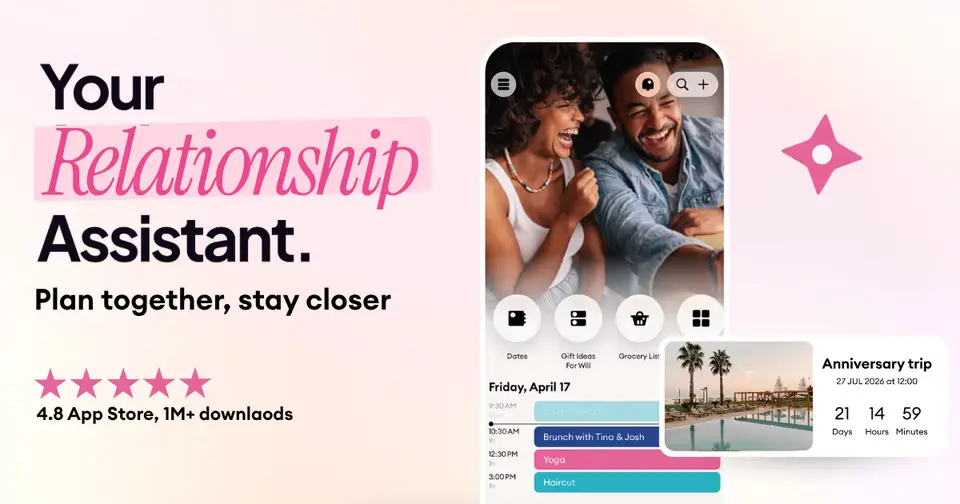
Cupla is a planning app for couples from Cupla Limited, based in Auckland, New Zealand. It brings both partners' Google, Apple and Outlook calendars into one side-by-side view and adds shared to-dos and lists, wishlists, a date planner, key dates with countdowns and an AI assistant. The app is free with a limit on how far ahead you can see your partner's plans; Cupla Premium, one subscription per couple, removes that limit.
Worth knowing
- Cupla connects exactly two accounts. The help center says a third person, such as a child or roommate, cannot be added.
- The free version shows a partner's events and to-dos only in a limited window around today; the help center does not give its length.
- Prices are not on the website. The US App Store lists several amounts for the same subscription, plus a $39.99 item named Cupla Plus.
- Cupla AI is not on the web version, and the platform comparison says it is not yet on Android. Accounts must be created in a mobile app.
Key features
- Both schedules in one view
- Google, Apple, Outlook and any other calendar on the phone appear in a color-coded view of both partners, shown side by side, stacked or by month. Changes sync back to the original calendar app.
- Per-event privacy
- Each partner chooses what the other sees, so some events can be shared in full and others kept private.
- Shared to-dos and lists
- Task lists carry priorities, labels, reminders and recurring tasks, and a task can be assigned to one partner or both. A grocery list is always shared in full, even on the free version.
- Date planner and key dates
- Set a goal for how often to go on a date and get reminders to meet it. Key dates count down to anniversaries, birthdays and trips, with notices a week before, a day before and on the day.
- Cupla AI
- An assistant that reads the shared calendar, to-dos, wishlists and key dates to plan a date, find time both partners have free, or turn a typed paragraph into events and to-dos.
- Wishlists
- Links sent from TikTok, Instagram or the web are sorted into shared collections such as travel, restaurants and gift ideas. On the web version an item can be turned into an event or a to-do.
Cupla pricing
As of Oct 9, 2026, Cupla has a free plan, and paid plans start at $4.99 per month, or $34.99 per year, per couple (US App Store).
- Starts at
- $4.99 per month, or $34.99 per year, per couple (US App Store)
- Free plan
- All core features. Your own events and to-dos show at any date, your partner's only within a limited window around today, and Cupla AI is under fair-usage limits.
- Free trial
- 14-day free trial of Cupla Premium with the annual subscription, on iOS and Android
| Plan | Price | What you get |
|---|---|---|
| Free | $0 | Shared calendar, to-dos and lists, grocery list, wishlists, date planner, key dates, widgets and the web version, with a limited view of your partner's schedule. |
| Cupla Premium (Monthly) | $4.99 to $7.99per month, per couple; App Store lists $4.99, $5.99 and $7.99 | Removes the time-range limit on your partner's calendar and to-dos and raises Cupla AI usage limits. One subscription covers both partners. |
| Cupla Premium (Yearly) | $34.99 to $59.99per year, per couple; App Store lists $34.99, $44.99 and $59.99 | The same Premium features billed once a year. The 14-day free trial is offered with this option. |
Read from apps.apple.com on Oct 9, 2026. Prices change, so confirm with Cupla before you buy.
Ways to pay less
- Annual discountYearly plan costs less than paying monthly
At the lowest prices on the US App Store, Yearly is $34.99 and Monthly is $4.99, which comes to $59.88 over twelve months. Higher price points are also listed for both.
Stated on apps.apple.com
How people rate the Cupla app
4.7
out of 5 for the iPhone and iPad app
- 5 stars85%
- 4 stars8%
- 3 stars2%
- 2 stars1%
- 1 star4%
2,299 ratings on the App Store in the United States, read Oct 9, 2026. It rates the app, not everything the product does. See the listing
Works with
Cupla alternatives
- Cupla vs TimeTree
Free plan · from $4.49/mo
- Cupla vs OurCal
Free trial · from $6.99/mo
- Cupla vs Howbout
Free plan · from $4.99/mo
- Cupla vs Cozi
Free plan · from $39/yr
- Cupla vs Google Calendar
Free plan · from $7/mo





Common questions
Does Cupla have a Windows app?
No Windows app was listed when its pages were read on Oct 9, 2026. Cupla is listed for iOS, Android and Web.
Does Cupla have a macOS app?
No macOS app was listed when its pages were read on Oct 9, 2026. Cupla is listed for iOS, Android and Web.
Is Cupla open source?
Cupla is not described as open source on its own site, as read on Oct 9, 2026.
Sources for this page
The prices, plans, platforms and features above were read from these pages on Oct 9, 2026. What people say is linked where it appears.
- cupla.app/
- cupla.app/the-app/
- cupla.app/about-us/
- cupla.app/help/en/articles/15051405-what-is-the-difference-between-the-free-and-paid-version
- cupla.app/help/en/articles/15051409-how-does-my-subscription-work
- cupla.app/help/en/articles/15051410-how-does-the-free-trial-work
- cupla.app/help/en/articles/15170961-what-is-cupla-for-desktop
- cupla.app/help/en/articles/15171057-what-s-the-difference-between-cupla-on-ios-android-and-desktop
- cupla.app/help/en/articles/15161950-what-is-cupla-and-who-is-the-team-behind-it
- cupla.app/help/en/articles/17238267-can-i-add-family-members-to-cupla
- apps.apple.com/us/app/cupla-couples-shared-calendar/id1557764033