What is Merkuro Calendar?
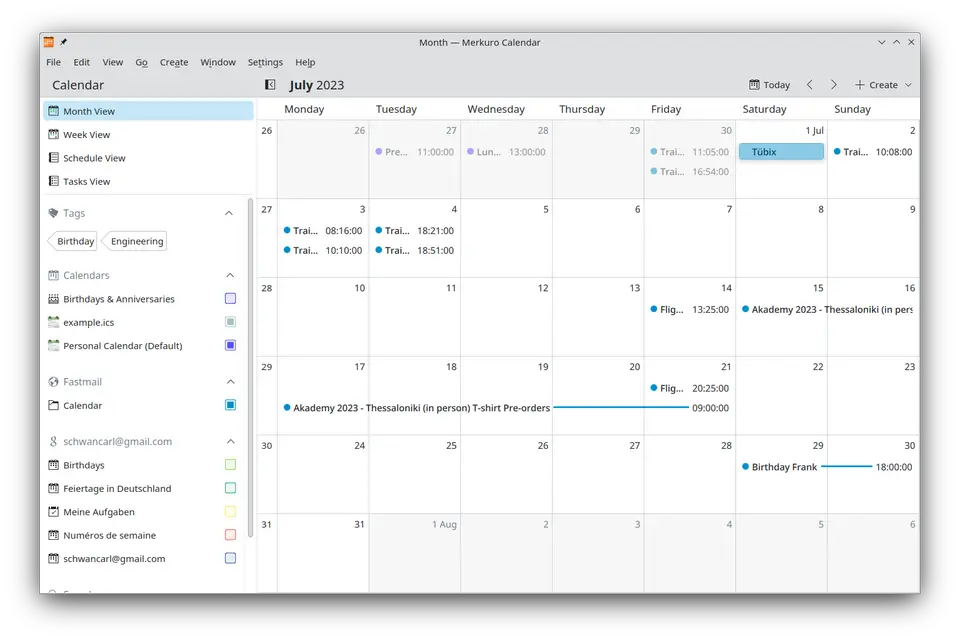
Merkuro Calendar is the calendar part of Merkuro, KDE's suite of email, calendar, contact and task apps, which was formerly known as Kalendar. It has month, week and schedule views and a task view with subtasks, and it works with local calendars as well as online ones such as Nextcloud, Google Calendar and Exchange through KDE's Akonadi framework. It is free software under GPL-3.0-or-later, built to be usable on both desktop and mobile screens.
Merkuro Calendar is free to use. See every plan
Good for
- KDE Plasma users who want a calendar made for their desktop
- Linux users syncing Nextcloud, Google or Exchange calendars
- People who keep tasks and subtasks next to their events
Worth knowing
- Stable releases are for Linux. The Windows builds on KDE's site are nightly installers that KDE labels unstable and intended for testing.
- It depends on Akonadi and KDE PIM packages; without kdepim-runtime, the project says the calendar component is heavily restricted.
- The Kontact Flatpak that includes Merkuro lacks some desktop integration, such as the calendar applet plugin, so KDE recommends a distribution package.
- Proton Calendar cannot be connected, and services with non-standard calendars or task lists, such as Todoist, are not supported.
Key features
- Month, week and schedule views
- The month view gives an overview of the whole month, the week view shows each day hour by hour, and the schedule view lists upcoming events in order.
- Tasks and subtasks
- A separate task view shows tasks and their subtasks as a tree, with filters that can be customized.
- Local and online calendars
- Supports CalDAV calendars such as Nextcloud, Google and Exchange calendars, iCal files and folders, and Kolab and Open-Xchange groupware servers.
- Sync through Akonadi
- KDE's Akonadi framework fetches, edits, creates and deletes events on remote services. The project recommends installing the kdepim-runtime package before starting the app.
- Plasma clock widget integration
- Events can appear in the calendar of Plasma's digital clock widget by enabling the PIM Events Plugin in the widget's settings and choosing which calendars to show.
- Desktop and mobile layouts
- The interface is designed for desktop, mobile and sizes in between, and the listing includes a mobile view. The project describes it as syncing across a Plasma desktop or phone.
Merkuro Calendar pricing
- Starts at
- Free
- Free plan
- Free and open source under GPL-3.0-or-later, installed from a Linux distribution's packages or as part of the Kontact Flatpak. KDE lists no paid version and asks for donations.
- Free trial
- None listed
| Plan | Price | What you get |
|---|---|---|
| Merkuro Calendar | $0 | The complete app, installed through Discover, a distribution's package manager or the Kontact Flatpak. Release 26.08.2 is dated 2026-10-08. |
Read from apps.kde.org on Oct 9, 2026. Prices change, so confirm with Merkuro Calendar before you buy.
Works with
- Nextcloud
- Google Calendar
- Microsoft Exchange
- Outlook
- Kolab
- Open-Xchange
- CalDAV
Merkuro Calendar alternatives
- Merkuro Calendar vs Rainlendar
Free plan · from €9.95 one-time
- Merkuro Calendar vs CalenGoo
Free trial · from $5.99 one-time
- Merkuro Calendar vs Tuta Calendar
Free plan · from €3/mo
- Merkuro Calendar vs Google Calendar
Free plan · from $7/mo



Common questions
Is Merkuro Calendar free?
Yes. Merkuro Calendar is free to use. Free and open source under GPL-3.0-or-later, installed from a Linux distribution's packages or as part of the Kontact Flatpak. KDE lists no paid version and asks for donations.
How much does Merkuro Calendar cost?
Merkuro Calendar lists one plan. Merkuro Calendar: $0. Prices were read from apps.kde.org on Oct 9, 2026.
What platforms does Merkuro Calendar work on?
Merkuro Calendar is available on Linux.
Does Merkuro Calendar have an Android app?
No Android app was listed when its pages were read on Oct 9, 2026. Merkuro Calendar is listed for Linux.
Does Merkuro Calendar have an iPhone app?
No iPhone app was listed when its pages were read on Oct 9, 2026. Merkuro Calendar is listed for Linux.
Is Merkuro Calendar open source?
Yes. Merkuro Calendar is open source, according to its own site.
What does Merkuro Calendar integrate with?
Merkuro Calendar's listing names Nextcloud, Google Calendar, Microsoft Exchange, Outlook, Kolab, Open-Xchange and CalDAV. A listing names up to eight integrations, so it may connect to more.
Who makes Merkuro Calendar?
Merkuro Calendar is made by KDE.
What are the alternatives to Merkuro Calendar?
The closest alternatives to Merkuro Calendar in our directory are GNOME Calendar, Rainlendar, CalenGoo, Tuta Calendar and Google Calendar. Each one has a side-by-side comparison with Merkuro Calendar.
Sources for this page
The prices, plans, platforms and features above were read from these pages on Oct 9, 2026.