
Zoom Scheduler review (2026): is the free plan enough?
Booking pages and meeting polls built into Zoom Workplace
Black Friday: is there a Zoom Scheduler sale?
Zoom Scheduler report card
Fair · out of 4.0 · graded Oct 10, 2026
Best for booking links for people already on Zoom
Zoom Scheduler is Zoom's booking-link tool. The free plan gives one booking page and one calendar with a video link on every booking, and $4.99 a month adds round robin and text reminders. But Zoom's name stays on free pages, Stripe payments work in the US and UK only, iCloud is still in beta, data is stored in the US, and the phone apps only do a limited set of read functions.
Who Zoom Scheduler is for
- Fits if your team is on Zoom Workplace Business, because Scheduler is already in the price
- Works for sales and hiring teams that need round robin or a panel of hosts
Who Zoom Scheduler is not for
- Skip it if you take payment at booking outside the US and UK, as Stripe only works in those two
- Tight if you won't pay and need more than one booking page or one calendar, or want Zoom's name off the page
- Not for you if you set bookings up from your phone, where the apps only read a limited set of things
- Watch out: Zoom's pricing FAQ says Scheduler data is currently stored in the US
- Watch out: iCloud calendar support is still in beta
Why Zoom Scheduler gets a 2.2
Five grades, each with its reason. The GPA is their average: an A is 4 points, an F is none.
- CValue for moneyThe paid licence is $4.99 a person a month on yearly billing, $5.99 monthly, which sits just under the $6 middle for calendar tools. One price covers round robin, routing forms and text reminders, which rivals often hold back for a dearer tier. It's also included in Zoom Workplace Business.
- CFree plan and trialScheduler Basic costs nothing: one booking page, one calendar connection, unlimited meeting polls and a video link on every booking. One page and one calendar gets tight the moment you offer two kinds of meeting, and Zoom's name stays on the page.
- CFeaturesBooking pages, round robin, collective scheduling across several hosts, polls, routing forms, up to 6 calendars, and email and text reminders. It does the booking-link job fully and nothing beyond it, and the listing's gaps are real: Stripe payments in the US and UK only, iCloud still in beta.
- CEase of useNo store rating on record for Scheduler by itself. It lives inside Zoom Workplace, so Zoom people aren't learning a new app, but you still connect a calendar and build your pages and forms before a link is worth sending.
- BPlatforms and integrationsWeb, Mac, Windows, iPhone and Android, working with Google Calendar, Microsoft 365, Google Meet and Teams as well as Zoom. But Zoom's own technical library says the phone apps only do a limited set of read functions for Scheduler, so the mobile half barely counts.
What these grades rest on. Graded from this listing, whose facts were read from Zoom's own pages on 5 October 2026. Also tested with a demo account on 2026-04-11. How we review and grade.
Make Zoom Scheduler? Put this grade on your site

Paste this where you want the badge. It links here and follows the grade if it changes. About badges
<a href="https://toolgpa.com/tools/zoom-scheduler#review"><img src="https://toolgpa.com/badge/zoom-scheduler.svg" alt="Zoom Scheduler: 2.2 GPA on ToolGPA" width="196" height="56"></a>Where Zoom Scheduler stands among calendar and scheduling apps
Zoom Scheduler's GPA of 2.2 is higher than 22 of the 114 other calendar and scheduling apps we grade, and level with 23.
It stands best on platforms and integrations (B, above 34 of 114) and worst on ease of use (C, above 3).
Its paid plans start at $4.99 a month for each person, against a middle price of $8 for the category: 24 of the 85 others that charge start lower.
On features, ease of use and platforms it scores 2.3 out of 4. 19 tools score higher and cost less.
Each grade against the category
Every bar is all 115 calendar and scheduling apps we grade, cut by the letter each got. Zoom Scheduler’s own letter is outlined.
- CValue for moneyAbove 19 of 114, level with 50
- CFree plan and trialAbove 16 of 114, level with 50
- CFeaturesAbove 6 of 114, level with 71
- CEase of useAbove 3 of 114, level with 64
- BPlatforms and integrationsAbove 34 of 114, level with 75
Price against what you get
Each dot is one of 100 calendar and scheduling apps. Further left costs less, and higher up scores better on features, ease of use and platforms. Point at a dot to see which tool it is.
Features, ease of use and platforms, averaged
What paid plans start at, a month (each step along is roughly double) →
- The best score at each price
- Has a free plan
- No free plan
Keep Zoom Scheduler, or make your own?
Keep it
To replace Zoom Scheduler you would be making connections to other products, each kept working as those products change. That is not a weekend's work, with an AI app builder or without one.
That makes this kind of software worth paying for, not this one in particular: 69 of the 114 other calendar and scheduling apps grade higher. It costs $59.88 a year.
What you could make
- Reports: an app builder makes this well.
What you could not
- Connections to other products, each kept working as those products change.
- Booking pages that read and write other people's calendars and send the emails.
- Apps for macOS, Windows, iOS and Android that stay in step with each other.
- It is priced for each person, which means accounts and billing for a team.
What this rests on. Zoom Scheduler’s listing: what it does, where it runs, what it plugs into and what it costs. It is a judgement about the kind of software this is. We have not built a replacement for it, and making your own means looking after it too. How we decide, and every tool’s verdict.
What is Zoom Scheduler?
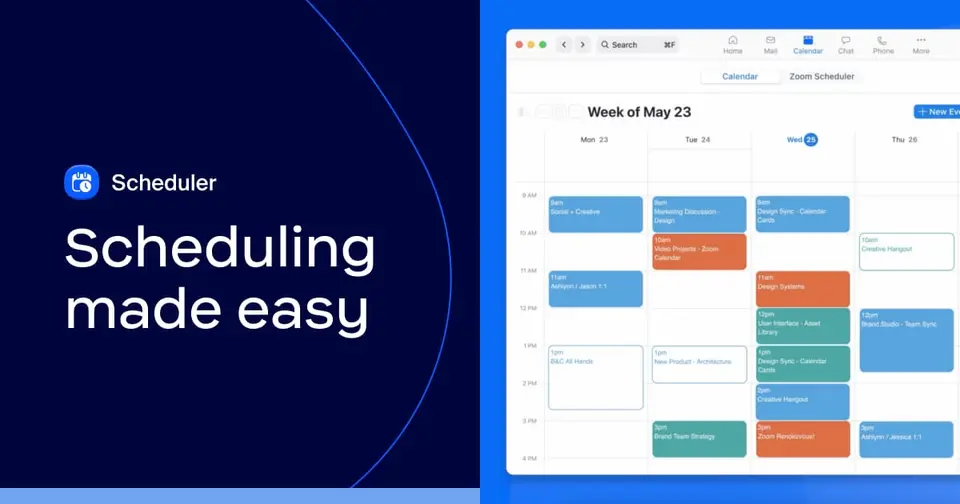
Zoom Scheduler is the appointment booking tool in Zoom Workplace. A host shares a booking page or a poll, invitees pick a time, and the event is added to the connected calendar with a Zoom, Google Meet or Microsoft Teams link. A free Scheduler Basic plan covers one booking page; the paid license is sold on its own per user and is also included in Workplace Business and higher plans.
Worth knowing
- The free Scheduler Basic plan covers one booking page and one calendar connection; round robin, SMS reminders and removing Zoom branding need the paid license.
- Collecting payment through Stripe is available in the US and UK only.
- Zoom's technical library says the iOS and Android apps currently support only a limited set of read functions for Scheduler.
- Zoom's pricing FAQ says Scheduler data is currently stored in the US.
Key features
- Booking pages
- Share a link for one-on-one meetings or let several attendees book the same slot. Pages take a custom URL, brand colors and a logo, and can be embedded in a website.
- Collective and round-robin scheduling
- Collective scheduling finds a time when several hosts are all free; round robin sends each booking to the next available team member. Both are part of the paid license.
- Scheduling polls
- Propose several times, let invitees vote, and book the slot most people prefer. Meeting polls are unlimited on the free Scheduler Basic plan.
- Calendar connections
- Connect a primary calendar and up to five more to block conflicts and receive new bookings. Google Calendar, Microsoft 365 and Zoom Calendar are supported; iCloud is in beta.
- Reminders and follow-ups
- Attendees get a confirmation when they book. The paid license adds customizable email and SMS reminders and follow-up messages before and after a meeting.
- Routing forms and payments
- Booking form questions can qualify leads and route them to the right person or page. Stripe payments at booking are offered in the US and UK only.
Zoom Scheduler pricing
As of Oct 5, 2026, Zoom Scheduler has a free plan, and paid plans start at $4.99 per user / month, billed annually ($5.99 billed monthly).
- Starts at
- $4.99 per user / month, billed annually ($5.99 billed monthly)
- Free plan
- Scheduler Basic: one personal booking page, one calendar connection, unlimited meeting polls, one-off booking links, automatic confirmations and video links on every booking.
- Free trial
- 14-day free trial of the paid Scheduler license
| Plan | Price | What you get |
|---|---|---|
| Scheduler Basic | $0 | One personal booking page, one calendar connection, unlimited meeting polls, one-off booking links and automatic confirmations. |
| Scheduler | $4.99per user / month, billed annually ($5.99 billed monthly) | Unlimited booking pages, round-robin and group meetings, up to 6 calendars, email and SMS reminders, routing forms, analytics and no Zoom branding. |
| Workplace Business | $219.90per user / year ($21.99 per user billed monthly) | Zoom Workplace bundle that includes every Scheduler feature, plus 300-participant meetings, chat, whiteboards, AI note-taking and 10 GB of cloud storage. |
Read from zoom.us on Oct 5, 2026. Prices change, so confirm with Zoom Scheduler before you buy.
Ways to pay less
- Annual discountSave up to 16% with annual billing
Zoom's Scheduler pricing page lists a saving of up to 16% on annual billing: $59.90 per user for the year, against $5.99 a month.
Stated on zoom.us
Works with
- Zoom Meetings
- Google Calendar
- Microsoft 365
- Apple iCloud
- Google Meet
- Microsoft Teams
- Stripe
Jobs at Zoom Communications
Any open roles at Zoom Communications are on its own careers page. We can’t read a count from there, so have a look.
Applications go to Zoom Communications, not to us.
Zoom Scheduler alternatives
- Zoom Scheduler vs Calendly
Free plan · from $10/mo
- Zoom Scheduler vs Cal.com
Free plan · from $12/mo
- Zoom Scheduler vs Microsoft Bookings
Free trial · from $5.40/mo
- Zoom Scheduler vs SavvyCal
Free trial · from $10/mo
- Zoom Scheduler vs Doodle
Free plan · from $11/mo





Common questions
Does Zoom Scheduler have a Linux app?
No Linux app was listed when its pages were read on Oct 5, 2026. Zoom Scheduler is listed for Web, macOS, Windows, iOS and Android.
Is Zoom Scheduler open source?
Zoom Scheduler is not described as open source on its own site, as read on Oct 5, 2026.
Sources for this page
The prices, plans, platforms and features above were read from these pages on Oct 5, 2026.