
Notion Calendar review (2026): is it any good?
Free calendar app that connects to Notion databases

Our verdict
Third of our top three calendar and scheduling apps
For: People with several calendar accounts who want a desktop app
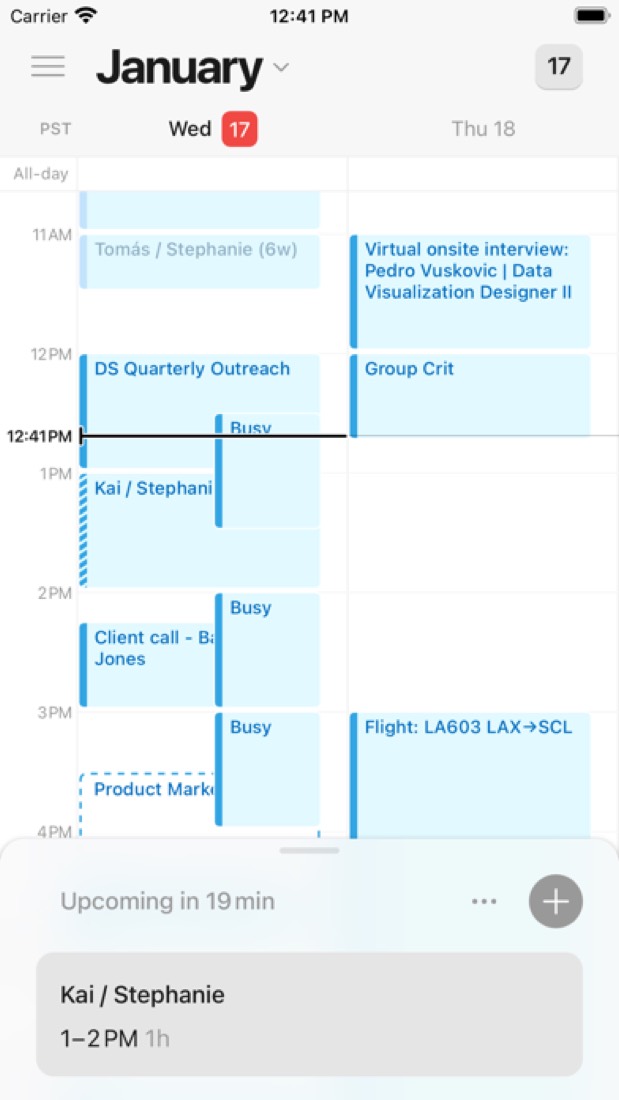
Notion Calendar is free with no paid tier of its own, and it has Mac and Windows apps as well as web, iPhone and Android ones. It shows Google Calendar, Apple iCloud and Microsoft Outlook calendars in one view, can block busy slots across them, and includes scheduling links. Its iPhone and iPad app averages 4.7 from about 7,600 ratings. It is third because it overlaps with Google Calendar more than NeetoCal does, and its phone apps do less: they show only 1 to 3 day views and cannot search events or edit most of them, and Notion says mobile support for Outlook calendars is still coming.
See all three and how we rankNotion Calendar review
Excellent · out of 4.0 · graded Oct 10, 2026
Best for seeing Notion deadlines next to your meetings
Notion Calendar is a free calendar app that puts Google, iCloud and Outlook calendars and dated Notion items on one grid, with nothing to upgrade to. The phone app shows 3 days at most, can't search and can't edit most events, Outlook isn't on the phone yet, and there's no travel time or Linux app. If your phone is your main calendar, look elsewhere.
Who Notion Calendar is for
- Fits if your tasks live in Notion and your meetings in Google, and you want both on one grid
- Works for sending a booking link from a computer without paying for a scheduling app
Who Notion Calendar is not for
- Skip it if your phone is your main calendar: the app shows 3 days at most, can't search and can't edit most events
- Not for you if work is on Outlook and you check it on your phone, as Notion says that's still coming
- Watch out: Focus time and out-of-office events need a Google Workspace account, and there's no travel time at all
- Tight if you keep two Notion accounts, since only one can be linked to a Notion Calendar account
- Not for you if you want a Linux desktop app: it's the website or nothing there
Why Notion Calendar gets a 3.6
Five grades, each with its reason. The GPA is their average: an A is 4 points, an F is none.
- AValue for moneyNothing to buy, in a category whose middle plan is $6 a month. Several accounts in one view, scheduling links and Notion databases are all free, where Fantastical keeps booking links for its $4.75 a month plan.
- AFree plan and trialThe whole app is free on every device, with no paid tier of its own and nothing to unlock later. You sign in with a Notion account, and Notion's own free plan covers it.
- CFeaturesOn a computer there are scheduling links, time zones side by side, busy slots blocked across calendars and a shortcut for everything. Notion's own help pages list the gaps: the phone app shows 3 days at most, can't search or edit most events, there's no travel time, and Focus needs Google Workspace.
- AEase of use4.7 from about 7,600 App Store ratings, the top band in this category. Connecting iCloud does mean making an app-specific password on Apple's site first.
- APlatforms and integrationsWeb, Mac, Windows, iPhone and Android, reading Google, iCloud and Outlook calendars with Zoom, Meet and Teams links. No other app in this category lists more platforms. No Linux app, and Outlook calendars aren't on the phone apps yet.
The good
What does it do? It puts your calendars in one place, and it costs nothing.
Work on Google, family on iCloud, a client on Outlook. They all show on the same grid. It can also block busy slots across them, so the dentist on your personal calendar stops a colleague booking that hour at work.
Then there's the Notion part. Any Notion database with a date in it can sit next to your meetings. Drag "Draft proposal" from Tuesday to Thursday and the date changes in Notion too.
Scheduling links are built in. Mark the hours you're free, send the link, and whoever picks a slot lands on your calendar.
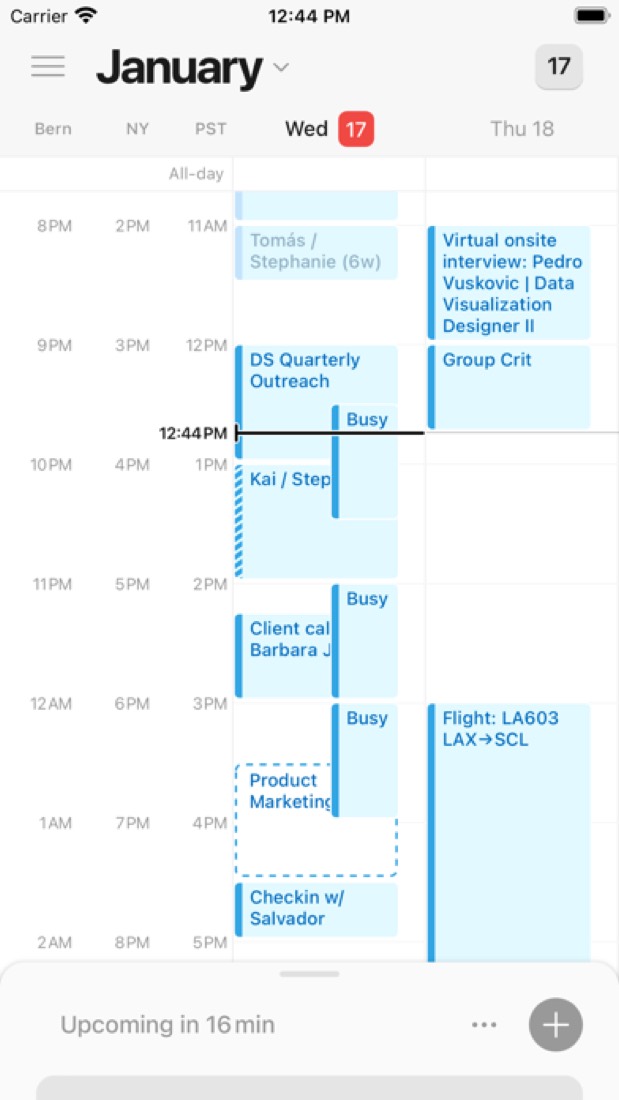
There's a command menu, pressing ? lists the shortcuts, and you can line up several time zones down the side of the day.
The stuff that'll bug you
The phone app is the weak half, and Notion's own help page lists what it can't do.
You get one, two or three days on screen. No week, no month. You can't search. You can't edit an event unless you made it on your phone and you're the organizer. You can't make Focus or out-of-office events there either. One reviewer keeps Google Calendar installed just to see a whole month.
Outlook calendars don't show on the phone apps yet. Notion says that's coming.
There are gaps on the computer too. There's no travel time. Focus time and out-of-office events only work with a Google Workspace account. Connecting iCloud means making an app-specific password on Apple's site first. And only one Notion account can be linked, so separate work and personal Notion accounts won't both show.
It's been buggy for some. Reviews from this year describe events vanishing on the phone and Notion databases that wouldn't show up. One long-time user says a summer update made finished tasks disappear from the day.
And there's no Linux app, only the website.
Money
Nothing to pay. There's no Pro version of Notion Calendar and nothing to unlock later.
Notion's pricing page lists it under every Notion plan, the free one included. So you don't have to pay for Notion to get it.
You do need a Notion account to sign in. Haven't got one? Signing up for the calendar makes one for you.
So what's the catch? Some features lean on somebody else's paid plan. Focus time and out-of-office events need a work or school account on Google Workspace.
And the Notion side only matters if your tasks and projects are already in Notion. If they're not, this is a free calendar with a booking link.
For comparison, Fantastical charges $4.75 a month on yearly billing for the plan with booking links.
What actual users say
Notion Calendar has 4.7 on the App Store from about 7,600 ratings.
The positive reviews mostly talk about the look. One likes that a stray tap doesn't create an event, the way it does for them in Google Calendar. Another uses it every day for work and says it syncs quickly with their other calendars.
One request keeps coming back: a week or month view on the phone. That same daily user called it their only gripe, and a big one.
This year's low-star reviews are about things breaking. A student's classes kept disappearing or landing on the wrong days. A Notion user's databases stopped showing on their iPhone. Someone else found that ticking off a task now wipes it from the calendar.
One reviewer feels ignored as well. They say the small fixes people keep asking for take years while new AI features keep arriving.
Hacker News barely mentions it. One commenter keeps Google Calendar as the real thing and runs Notion Calendar only for the meeting alerts.
What this review rests on. Based on Notion's Calendar product page, its pricing page and its help pages on the apps, accounts, events, scheduling links, connections and Notion databases as of 9 October 2026, its App Store listing and reviews, and Hacker News comments about it. Also tested with a demo account on 2026-07-18. How we review and grade.
Make Notion Calendar? Put this grade on your site

Paste this where you want the badge. It links here and follows the grade if it changes. About badges
<a href="https://toolgpa.com/tools/notion-calendar#review"><img src="https://toolgpa.com/badge/notion-calendar.svg" alt="Notion Calendar: 3.6 GPA on ToolGPA" width="196" height="56"></a>Where Notion Calendar stands among calendar and scheduling apps
Notion Calendar's GPA of 3.6 is higher than 114 of the 114 other calendar and scheduling apps we grade.
It stands best on platforms and integrations (A, above 110 of 114) and worst on features (C, above 6).
Notion Calendar has no paid plan.
On features, ease of use and platforms it scores 3.3 out of 4, and no tool on the category's chart scores higher without costing more.
Each grade against the category
Every bar is all 115 calendar and scheduling apps we grade, cut by the letter each got. Notion Calendar’s own letter is outlined.
- AValue for moneyAbove 79 of 114, level with 35
- AFree plan and trialAbove 94 of 114, level with 20
- CFeaturesAbove 6 of 114, level with 71
- AEase of useAbove 102 of 114, level with 12
- APlatforms and integrationsAbove 110 of 114, level with 4
Price against what you get
Each dot is one of 100 calendar and scheduling apps. Further left costs less, and higher up scores better on features, ease of use and platforms. Point at a dot to see which tool it is.
Features, ease of use and platforms, averaged
What paid plans start at, a month (each step along is roughly double) →
- The best score at each price
- Has a free plan
- No free plan
Keep Notion Calendar, or make your own?
Your call
A calendar at its plainest is events on a grid.
Notion Calendar is free, so making your own saves no money. Make it only if you want it built your way.
What you could make
- Calendar: an app builder makes this well.
What you could not
- Booking pages that read and write other people's calendars and send the emails.
- Apps for macOS, Windows, iOS and Android that stay in step with each other.
- It plugs into other products, Notion, Google Calendar and Apple iCloud among them.
- Sharing with other people, which means accounts and invitations.
What this rests on. Notion Calendar’s listing: what it does, where it runs, what it plugs into and what it costs. It is a judgement about the kind of software this is. We have not built a replacement for it, and making your own means looking after it too. How we decide, and every tool’s verdict.
What is Notion Calendar?
Notion Calendar is a free calendar app from Notion that shows Google Calendar, Apple iCloud and Microsoft Outlook calendars in one view. Dated items from connected Notion databases can appear next to events and be rescheduled by dragging them. It also includes availability sharing with scheduling links, a command menu and a multi-time-zone display.
Worth knowing
- The mobile apps show only 1 to 3 day views and cannot search events, edit most events or create Focus and out-of-office events.
- Notion's help center says mobile support for Microsoft Outlook calendars is still coming.
- Focus time and out-of-office events need a Google Workspace account, and travel time is not supported.
- Only one Notion account can be linked to a Notion Calendar account, and no Linux desktop app is listed.
Key features
- Several calendar accounts in one view
- Connects Google Calendar, Apple iCloud and Microsoft Outlook calendars and can automatically block busy slots across them.
- Notion database items on the calendar
- Dated items from connected Notion databases appear next to events. Dragging one to a new time updates the Notion database.
- Availability and scheduling links
- Mark open times on the calendar and send them to others, or share a scheduling link that lets people book time with you.
- Command menu and shortcuts
- A command menu and keyboard shortcuts cover common actions; pressing ? in the app lists every shortcut.
- Time zone display
- Shows the day across several time zones, which helps when planning meetings with people in other regions.
- Conferencing links
- Creates Zoom meetings from an event, offers Google Meet by default on Google calendars and Microsoft Teams on Outlook calendars.
Notion Calendar tips most people miss
Shortcut
Press Z to plan from another time zone for a while
Off on a trip, or setting up a call in Tokyo? Z travels to a new time zone, which becomes your main one for now. Right-click it if you want to keep it. And Cmd+K (Ctrl+K on Windows) then typing time zone brings up every time zone option.
notion.comShortcut
N and B hop between events, J and K by the week
N jumps to your next event and B goes back one. J and K move forward and back a week or a month, depending on your view, and T brings you back to today. Press ? for the full list, which you can search.
notion.comSetting
Set a join-meeting shortcut that works from any app
Some shortcuts work even when Notion Calendar is in the background, like joining a meeting or showing the menu bar calendar. Change them under Settings, Menu bar, System-wide keyboard shortcuts by picking one and pressing your own keys.
notion.comSetting
Taking a calendar out of the menu bar also mutes its meeting alerts
On a computer, right-clicking a calendar in the sidebar and turning off Events included in menu bar hides it from the menu bar. Notion's help page says it also turns off meeting notifications for that calendar, so don't do it to your work one by mistake.
notion.comEasy to miss
Shift-click several events to move or recolour them together
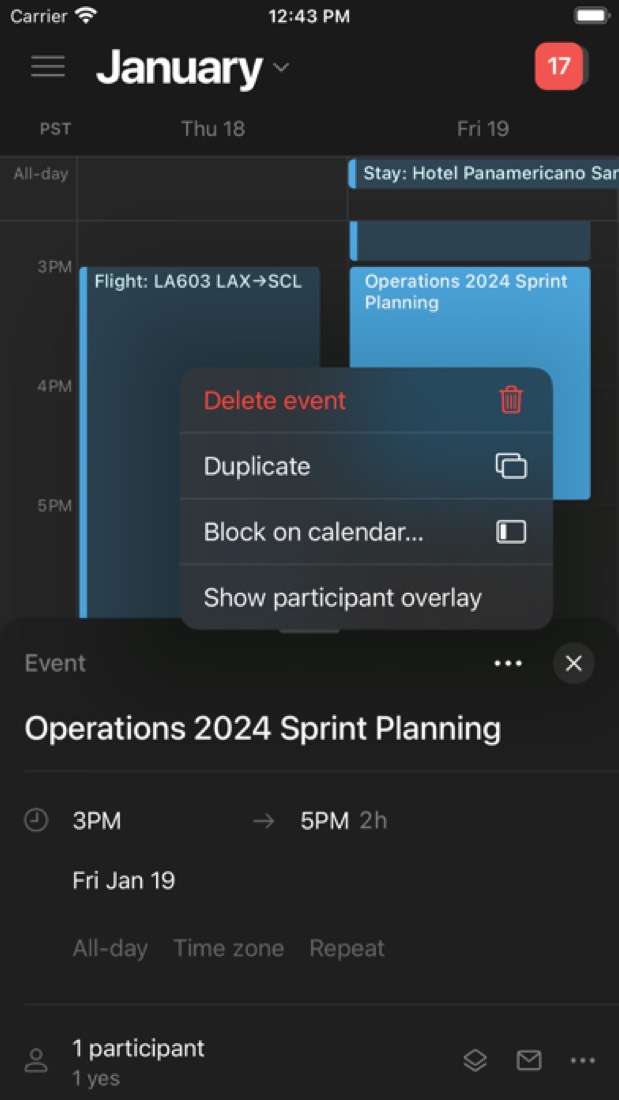
Hold Shift and select a few events, then drag them to a new time together, or right-click to change their colour or block them on another calendar. Type birthday in an event's name and it becomes a yearly, all-day birthday too.
notion.comSetting
Turn on Avoid conflicts before you send a scheduling link
With Avoid conflicts on, your link drops times that clash with new events as they land on your calendar. Each link can also have an expiry date and a booking window with a minimum and maximum, so nobody grabs a slot in an hour or six months out.
notion.com
Read on Oct 17, 2026. Read from Notion's help centre on Notion Calendar (time zones, getting started, keyboard shortcuts, settings, managing events and scheduling links) on 17 October 2026. Not tried out: these tips are what its own pages say.
Notion Calendar pricing
As of Oct 4, 2026, Notion Calendar is free to use.
- Starts at
- Free
- Free plan
- Notion Calendar is free to use and has no paid tier of its own. Notion's pricing page lists it under every Notion plan, including the Free plan.
- Free trial
- None listed
| Plan | Price | What you get |
|---|---|---|
| Free | $0 | The full calendar app on web, desktop and mobile, with scheduling links and Notion database calendars. |
Read from notion.com on Oct 4, 2026. Prices change, so confirm with Notion Calendar before you buy.
How people rate the Notion Calendar app
4.7
out of 5 for the iPhone and iPad app
7,567 ratings on the App Store in the United States, read Oct 5, 2026. It rates the app, not everything the product does. See the listing
Works with
Who makes Notion Calendar
Notion Calendar is made by Notion Labs, Inc., the San Francisco company behind the Notion workspace. The calendar app has no paid tier of its own; Notion earns money from paid Plus, Business and Enterprise plans for its workspace and AI features.
- Founded
- 2013notion.com
- Based
- San Francisco, with offices around the worldnotion.com
- Ownership
- Privately held. Privately held and venture-backed. Its own post of January 2026 names Sequoia Capital and Index Ventures as returning investors and GIC as a new one, and no parent company is named.notion.com
- Funding
- $50 million led by Index Ventures in April 2020, after which the company told TechCrunch it had raised $67 million in all, then $275 million led by Sequoia Capital and Coatue in October 2021. CNBC says it has raised no outside capital since. Its 2022 and 2026 share sales were tender offers to employees, not money for the company.cnbc.comsiliconangle.comtechcrunch.comnotion.com
- Founders and leaders
- Ivan Zhao, CEO & Foundernotion.com
- Simon Last, Co-foundernotion.com
- Akshay Kothari, Co-foundernotion.com
- Rama Katkar, CFOnotion.com
- Hiring
- 164 open roles on its job board, read Nov 17, 2026. See the roles
- Affiliate program
- Up to $50 per activated sign-up plus 20% of first-year revenue for each referral, tracked through PartnerStack, for workspaces that upgrade within 180 days. The page says the program is not accepting new affiliates.notion.com
- Lately
- New calendar tools for your agent · Jul 16, 2026
- Notion 3.6: External Agents, HTML blocks, and more · Jul 1, 2026
- Mail & Calendar, now in your settings · Apr 17, 2026
- Notion 3.2: Mobile AI, new models, people directory · Jan 20, 2026
Read on Oct 18, 2026 from the company’s own pages and from news reports. What is not stated there is left out.
Jobs at Notion
Notion has 164 open roles, most in Sales (66), Outcomes Architect (21) and Engineering (16). Here are the newest; open one to read the whole job and apply on Notion’s own site.
- Enterprise Solutions Consultant (New York, NY)NewView and apply
Sales and partnerships · Sales · New York, New York · posted 4 days ago
- Commercial Solutions ConsultantNewView and apply
Sales and partnerships · Sales · Singapore · Remote · posted 8 days ago
- Mid-Market Solutions ConsultantNewView and apply
Sales and partnerships · Sales · Singapore · Remote · posted 8 days ago
- Solutions Consultant ManagerNewView and apply
Sales and partnerships · Sales · Singapore · Remote · posted 8 days ago
- Business Development RepresentativeNewView and apply
Sales and partnerships · Sales · Singapore · Remote · posted 8 days ago
Read from Notion’s job board on Ashby on Nov 17, 2026 and checked every week. Applications go to Notion, not to us.
Notion Calendar alternatives
- Notion Calendar vs Google Calendar
Free plan · from $7/mo
- Notion Calendar vs Fantastical
Free plan · from $4.75/mo
- Notion Calendar vs Vimcal
Free plan · from $25/mo
- Notion Calendar vs Amie
Free trial · from $20/mo
- Notion Calendar vs Morgen
Free trial · from $15/mo




Featured in
Common questions
Does Notion Calendar have a Linux app?
No Linux app was listed when its pages were read on Oct 4, 2026. Notion Calendar is listed for Web, macOS, Windows, iOS and Android.
Is Notion Calendar open source?
Notion Calendar is not described as open source on its own site, as read on Oct 4, 2026.
Sources for this page
The prices, plans, platforms and features above were read from these pages on Oct 4, 2026. What people say is linked where it appears.
- notion.com/product/calendar
- notion.com/pricing
- notion.com/help/category/notion-calendar
- notion.com/help/notion-calendar-apps
- notion.com/help/create-a-notion-calendar-account
- notion.com/help/manage-your-calendars-and-events
- notion.com/help/guides/getting-started-with-notion-calendar
- notion.com/product/calendar/download