
zcal review (2026): is the free plan enough?
Free booking links with heavily customizable scheduling pages
Black Friday: is there a zcal sale?
zcal report card
Fair · out of 4.0 · graded Oct 10, 2026
Best for styled booking pages on a free plan
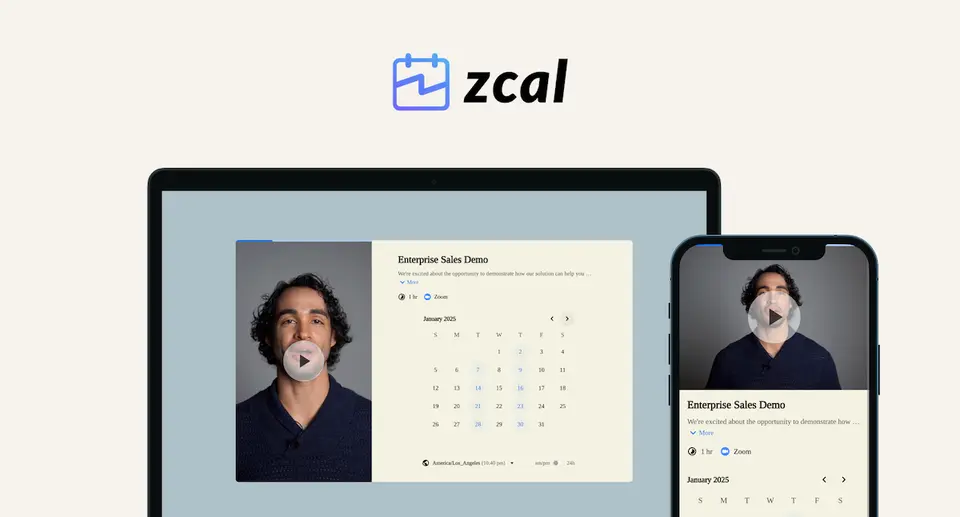
zcal's free plan has no cap on booking links, calendars or meeting polls, on a page you can style with a cover image and a welcome video. But Free takes a 3% cut of Stripe payments and puts zcal's name on your page, teams, round robin and SMS need Pro at $7 a user, custom domains need Business at $12, there's no phone app, and the pricing FAQ says zcal doesn't give refunds.
Who zcal is for
- Fits if you want unlimited booking links without paying
- Works for coaches or consultants who want the booking page styled to their brand
Who zcal is not for
- Pricey if you take payments on the free plan, where zcal keeps a 3% commission
- Tight if you're a team on Free, since teams, round robin, SMS reminders and removing the branding all need Pro
- Skip it if you want a phone app, as the site describes none
- Not for you if you like a refund safety net, because the pricing FAQ says zcal doesn't offer refunds
- Too light for reporting, as there's none, and no API beyond webhooks on Pro
Why zcal gets a 2.4
Five grades, each with its reason. The GPA is their average: an A is 4 points, an F is none.
- CValue for moneyPro is $7 a user a month billed annually, $10.50 monthly, for teams, round robin, SMS reminders, no zcal branding and no commission on payments. That's in the middle of calendar tools, and a custom domain means Business at $12.
- BFree plan and trialFree Forever puts no cap on invite links, meeting polls or calendar connections, and includes custom questions, email reminders and Stripe payments. One person could really live on it. The price is zcal's branding on your page and a 3% commission on every payment.
- CFeaturesPages styled from templates with colors and a welcome video, polls, group invites, paid bookings, email reminders, and round robin, collective events and follow-ups on Pro. It does the booking-link job fully, and that is all it does: no calendar of your own, no reporting and no API, only webhooks on Pro.
- CEase of useNo rating on record, and getting a page you'd send means picking a design template, connecting a calendar and writing your own questions. It's all in the browser, at least, with nothing to install.
- BPlatforms and integrationsA web app, and the site describes no mobile or desktop apps. It checks Google, Outlook and Apple calendars and works with Google Meet, Teams, Zoom, Stripe and Zapier, with webhooks on Pro.
What these grades rest on. Graded from this listing, whose facts were read from zcal's own pages on 5 October 2026. Its pricing page on 9 October 2026 gave our reader the same plan names but no prices, so the prices could not be compared again. Also tested with a demo account on 2026-04-01. How we review and grade.
Make zcal? Put this grade on your site
Paste this where you want the badge. It links here and follows the grade if it changes. About badges
<a href="https://toolgpa.com/tools/zcal#review"><img src="https://toolgpa.com/badge/zcal.svg" alt="zcal: 2.4 GPA on ToolGPA" width="196" height="56"></a>Where zcal stands among calendar and scheduling apps
zcal's GPA of 2.4 is higher than 46 of the 114 other calendar and scheduling apps we grade, and level with 15.
It stands best on free plan and trial (B, above 67 of 114) and worst on ease of use (C, above 3).
Its paid plans start at $7 a month for each person, against a middle price of $8 for the category: 39 of the 85 others that charge start lower.
On features, ease of use and platforms it scores 2.3 out of 4. 27 tools score higher and cost less.
Each grade against the category
Every bar is all 115 calendar and scheduling apps we grade, cut by the letter each got. zcal’s own letter is outlined.
- CValue for moneyAbove 19 of 114, level with 50
- BFree plan and trialAbove 67 of 114, level with 26
- CFeaturesAbove 6 of 114, level with 71
- CEase of useAbove 3 of 114, level with 64
- BPlatforms and integrationsAbove 34 of 114, level with 75
Price against what you get
Each dot is one of 100 calendar and scheduling apps. Further left costs less, and higher up scores better on features, ease of use and platforms. Point at a dot to see which tool it is.
Features, ease of use and platforms, averaged
What paid plans start at, a month (each step along is roughly double) →
- The best score at each price
- Has a free plan
- No free plan
Keep zcal, or make your own?
You could make this
A calendar at its plainest is events on a grid.
What zcal does at its core is templates, and that is the kind of thing an AI app builder makes well. You would give up 3 things, listed below, and little else. It costs $84 a year. An AI app builder starts at about $20 a month on our listings, and you only need it while you build.
What you could make
- Templates: an app builder makes this well.
- It runs in a browser, which is where something home-made would run too.
What you could not
- Booking pages that read and write other people's calendars and send the emails.
- It is priced for each person, which means accounts and billing for a team.
- It plugs into other products, Google Calendar, Outlook Calendar and Apple Calendar among them.
What this rests on. zcal’s listing: what it does, where it runs, what it plugs into and what it costs. It is a judgement about the kind of software this is. We have not built a replacement for it, and making your own means looking after it too. How we decide, and every tool’s verdict.
What is zcal?
zcal is a browser-based scheduling tool that turns a host's availability into a booking page styled with a cover image, welcome video, colors and layouts. The Free Forever plan covers individual use, with unlimited booking links, calendar connections and meeting polls. The paid Pro and Business plans add team scheduling, SMS reminders, branding removal and custom domains.
Worth knowing
- Teams, round robin and collective events, SMS reminders and removing zcal branding all need Pro.
- On the free plan zcal takes a 3% commission on Stripe payments, on top of Stripe's own fees.
- Custom domains and sending notifications from your own email domain need Business.
- The site describes no mobile or desktop apps, and zcal's pricing FAQ says it does not offer refunds.
Key features
- Styled scheduling pages
- Start from a design template and adjust layout, colors and media, add a welcome video, and ask custom questions. Custom fonts and unlimited videos are Pro features.
- Unlimited links and calendars
- The free plan puts no cap on booking links or connected calendars, and checks Google, Outlook and Apple calendars to avoid double bookings.
- Team scheduling
- Pro adds teams with a shared team page, collective events that need every selected host to be free, and round robin events with priority for chosen members.
- Meeting polls and group invites
- Polls let guests vote on proposed times before the host sets the final slot, and are unlimited on the free plan. Group invites let several people book one slot.
- Paid bookings through Stripe
- Charge invitees at booking through a connected Stripe account. The free plan adds a 3% zcal commission; Pro removes it and adds coupon codes.
- Reminders and follow-ups
- Email reminders are free. Pro adds SMS reminders, multiple and customized reminder messages, and automatic follow-up emails after a meeting.
zcal pricing
As of Oct 5, 2026, zcal has a free plan, and paid plans start at $7 per user / month, billed annually ($10.50 billed monthly).
- Starts at
- $7 per user / month, billed annually ($10.50 billed monthly)
- Free plan
- Free Forever plan: unlimited invite links and meeting polls, calendar sync, video conferencing links, custom questions, email reminders, and Zapier and Stripe integrations.
- Free trial
- 14-day free trial of Pro or Business, cancel anytime
| Plan | Price | What you get |
|---|---|---|
| Free Forever | $0 | For individuals: unlimited invite links, meeting polls and calendar connections, custom questions, email reminders and Stripe payments. |
| Pro | $7per user / month, billed annually ($10.50 billed monthly) | Teams, round robin and collective events, branding removal, custom fonts, SMS reminders, follow-up emails, webhooks and no zcal commission on payments. |
| Business | $12per user / month, billed annually ($18 billed monthly) | Everything in Pro, plus custom domains, notification emails sent from your own domain, unlimited teams and twice the SMS credits. |
Read from zcal.co on Oct 5, 2026. Prices change, so confirm with zcal before you buy.
Ways to pay less
- Annual discountAbout a third off with annual billing
zcal's pricing page shows Pro at $7 per user / month on annual billing against $10.50 monthly, and Business at $12 against $18, about 33% less.
Stated on zcal.co - EducationDiscounts for students, teachers and nonprofits
The pricing FAQ says students, teachers and nonprofits can get a discount by emailing zcal support. No rate is published.
Stated on zcal.co
Works with
zcal alternatives
- zcal vs Calendly
Free plan · from $10/mo
- zcal vs Cal.com
Free plan · from $12/mo
- zcal vs Koalendar
Free plan · from $6.99/mo
- zcal vs TidyCal
Free plan · from $29 one-time
- zcal vs Doodle
Free plan · from $11/mo




Common questions
Does zcal have an Android app?
No Android app was listed when its pages were read on Oct 5, 2026. zcal is listed for Web.
Does zcal have an iPhone app?
No iPhone app was listed when its pages were read on Oct 5, 2026. zcal is listed for Web.
Is zcal open source?
zcal is not described as open source on its own site, as read on Oct 5, 2026.
Sources for this page
The prices, plans, platforms and features above were read from these pages on Oct 5, 2026.