
ProjectLibre review (2026): is the free plan enough?
Microsoft Project-compatible scheduling: free desktop app, paid cloud
Black Friday: is there a ProjectLibre sale?
ProjectLibre report card
Very good · out of 4.0 · graded Oct 10, 2026
Best for a free stand-in for Microsoft Project
ProjectLibre is a free, open-source desktop scheduler for Windows, macOS and Linux that opens .mpp files and does Gantt charts, critical path and baselines. But the free app is for one person and their own files: collaboration, portfolios, resource leveling and AI are in the Cloud at $9.99 a user, billed annually only, with a 7-day trial. There are no phone apps.
Who ProjectLibre is for
- Fits if you're one project manager who wants a free desktop scheduler
- Works for moving schedules off Microsoft Project or Project Online, as .mpp files open directly
Who ProjectLibre is not for
- Skip it if your team wants to stay free, because collaboration is only in the paid Cloud
- Not for you if you want to pay month to month, since Core is billed annually only
- Too light for portfolios, resource leveling, risk analysis or AI if you're on the free app, as those are Cloud only
- Skip it if you want to check a plan on your phone, as there are no phone apps
- Watch out: the Cloud trial lasts 7 days, a higher tier is marked Coming Soon, and Core's portfolio claims carry an unexplained asterisk
Why ProjectLibre gets a 3.2
Five grades, each with its reason. The GPA is their average: an A is 4 points, an F is none.
- AValue for moneyThe desktop app costs nothing and includes Gantt, WBS, critical path, baselines, costs and earned value, where this category's cheapest quarter starts at $5.10 a user a month. The cloud plan is $9.99 a user, the dear end of the category, and annual billing only.
- AFree plan and trialProjectLibre Desktop is free and open source with no subscription and nothing metered, in 54 languages, but it's for one user and individual project files. The cloud side gets only a 7-day trial for up to 15 users, no card needed.
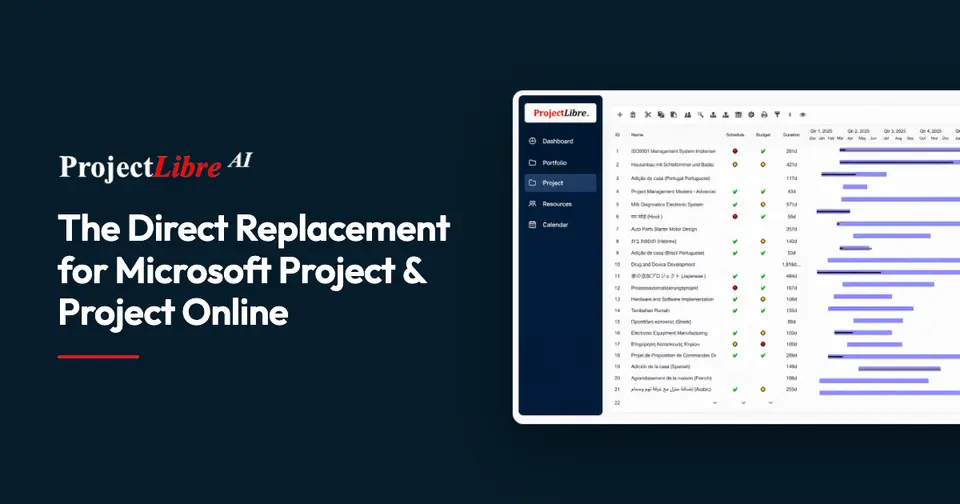
- BFeaturesScheduling with dependencies, constraints, calendars, baselines and critical path with float, as a Gantt chart, WBS chart or network diagram, with .mpp and Primavera .xer files opening directly. Cloud adds resource leveling, Monte Carlo risk analysis, DCMA audits and the Co-Pilot. No boards or task chatter.
- CEase of useNo store rating on record. Installing it is nothing and your old .mpp files open straight away, which saves a day. But critical path, constraints and earned value are a profession, not a feature you pick up over lunch.
- BPlatforms and integrationsWindows, macOS and Linux on the desktop plus the cloud version in a browser. No phone apps at all, though, and the only connections on record are Microsoft Project .mpp and Primavera .xer files.
What these grades rest on. Graded from this listing, whose facts were read from ProjectLibre's own pages on 9 October 2026. Also tested with a demo account on 2026-08-06. How we review and grade.
Make ProjectLibre? Put this grade on your site

Paste this where you want the badge. It links here and follows the grade if it changes. About badges
<a href="https://toolgpa.com/tools/projectlibre#review"><img src="https://toolgpa.com/badge/projectlibre.svg" alt="ProjectLibre: 3.2 GPA on ToolGPA" width="196" height="56"></a>Where ProjectLibre stands among project management tools
ProjectLibre's GPA of 3.2 is higher than 143 of the 149 other project management tools we grade, and level with 5.
It stands best on free plan and trial (A, above 139 of 149) and worst on ease of use (C, above 7).
Its paid plans start at $9.99 a month for each person, against a middle price of $9 for the category: 68 of the 121 others that charge start lower.
On features, ease of use and platforms it scores 2.7 out of 4. 18 tools score higher and cost less.
Each grade against the category
Every bar is all 150 project management tools we grade, cut by the letter each got. ProjectLibre’s own letter is outlined.
- AValue for moneyAbove 135 of 149, level with 14
- AFree plan and trialAbove 139 of 149, level with 10
- BFeaturesAbove 76 of 149, level with 68
- CEase of useAbove 7 of 149, level with 126
- BPlatforms and integrationsAbove 26 of 149, level with 95
Price against what you get
Each dot is one of 128 project management tools. Further left costs less, and higher up scores better on features, ease of use and platforms. Point at a dot to see which tool it is.
Features, ease of use and platforms, averaged
What paid plans start at, a month (each step along is roughly double) →
- The best score at each price
- Has a free plan
- No free plan
Keep ProjectLibre, or make your own?
You could make this
A project tool at its plainest is tasks on a board with an owner and a date.
What ProjectLibre does at its core is Gantt & timelines and reports, and that is the kind of thing an AI app builder makes well. You would give up 4 things, listed below, and little else. It costs $119.88 a year. An AI app builder starts at about $20 a month on our listings, and you only need it while you build. ProjectLibre is open source, so there is a third way: take its code and run it yourself.
What you could make
- Gantt & timelines and reports: an app builder makes these well.
What you could not
- Apps for macOS, Windows and Linux that stay in step with each other.
- Several people working in it at the same moment.
- AI features, unless you pay a model provider for each request yourself.
- The depth: we grade its features B, which means it covers the whole job.
What this rests on. ProjectLibre’s listing: what it does, where it runs, what it plugs into and what it costs. It is a judgement about the kind of software this is. We have not built a replacement for it, and making your own means looking after it too. How we decide, and every tool’s verdict.
What is ProjectLibre?
ProjectLibre is project scheduling software that comes in two forms. ProjectLibre Desktop is a free, open-source app for Windows, macOS and Linux, meant for one person managing individual project files. ProjectLibre Cloud is a browser-based subscription for teams that adds real-time collaboration, shared resource pools, portfolio management, risk analysis and an AI Co-Pilot. Both open Microsoft Project files.
Worth knowing
- The free Desktop app is for one user and individual projects; collaboration, portfolios, resource leveling, risk analysis and AI are in the paid Cloud.
- ProjectLibre Core is priced only with annual billing; the pricing section shows no month-to-month rate.
- A second, higher cloud tier is marked Coming Soon, and Core lists enterprise resource and portfolio management with an asterisk the page does not explain.
- The Cloud trial lasts 7 days and covers up to 15 users.
Key features
- CPM scheduling and Gantt charts
- Schedules use dependencies, constraints, calendars, baselines and critical path with float, shown as a Gantt chart, a WBS chart or a network diagram.
- Microsoft Project and Primavera import
- Opens Microsoft Project .mpp files and Primavera .xer files directly, keeping tasks, dependencies, resources and the project structure.
- Resource leveling and shared pools
- ProjectLibre Cloud finds over-allocated resources and levels them at the project or portfolio level, drawing on enterprise resource pools shared across projects.
- Risk analysis and schedule audits
- Cloud runs Monte Carlo risk analysis and DCMA schedule-quality audits on the schedule, alongside earned value reporting with SPI, CPI and TCPI.
- AI Co-Pilot
- In Cloud, the Co-Pilot builds a CPM schedule from a prompt and can then edit tasks, the WBS and resources as the project changes.
- Free desktop app
- ProjectLibre Desktop is installed on Windows, macOS or Linux, keeps project files on the user's computer and is offered in 54 languages.
ProjectLibre pricing
As of Oct 9, 2026, ProjectLibre has a free plan, and paid plans start at $9.99 per user / month, billed annually.
- Starts at
- $9.99 per user / month, billed annually
- Free plan
- ProjectLibre Desktop: a free, open-source app for a single user managing individual project files on Windows, macOS or Linux, with no subscription.
- Free trial
- 7-day free trial of ProjectLibre Cloud for up to 15 users, no credit card required
| Plan | Price | What you get |
|---|---|---|
| ProjectLibre Desktop | $0 | Free, open-source desktop app for one person: Gantt chart, WBS, critical path, baselines, single-project resources, costs and earned value. |
| ProjectLibre Core | $9.99per user / month, billed annually | The cloud plan on sale today: Microsoft Project import, Gantt and WBS scheduling, Core and Pro user modes and the AI Copilot. |
Read from projectlibre.com on Oct 9, 2026. Prices change, so confirm with ProjectLibre before you buy.
Works with
- Microsoft Project
- Primavera P6
ProjectLibre alternatives
- ProjectLibre vs Microsoft Project
Free trial · from $30.00/mo
- ProjectLibre vs GanttProject
Free plan · from €1/mo
- ProjectLibre vs OpenProject
Free plan · from $7.25/mo
- ProjectLibre vs ProjectManager
Free trial · from $15/mo
- ProjectLibre vs Smartsheet
Free trial · from $9/mo





Common questions
Does ProjectLibre have an Android app?
No Android app was listed when its pages were read on Oct 9, 2026. ProjectLibre is listed for Web, Windows, macOS and Linux.
Does ProjectLibre have an iPhone app?
No iPhone app was listed when its pages were read on Oct 9, 2026. ProjectLibre is listed for Web, Windows, macOS and Linux.
Is ProjectLibre open source?
Yes. ProjectLibre is open source, according to its own site.
Sources for this page
The prices, plans, platforms and features above were read from these pages on Oct 9, 2026.