Kanban Tool
Online kanban boards with time tracking and flow analytics
Kanban Tool report card
Very good · out of 4.0 · graded Oct 9, 2026
Best for kanban with WIP limits and flow charts
Kanban Tool is for teams that take kanban seriously: swimlanes, work-in-progress limits, and cumulative flow and cycle time reports on every plan. Team is $6 a user a month, and there's a version you install on your own servers. The free plan is tiny though, at 2 boards and 2 users, and time tracking and automation sit on Enterprise at $11.
Who Kanban Tool is for
- Great if your team runs kanban with WIP limits and flow metrics
- Handy when your organisation must keep board data on its own servers
- Good for two people whose work fits on the free plan's 2 boards
Who Kanban Tool is not for
- Tight if you're staying free, with 2 boards, 2 users and no file attachments
- Pricey if you need time tracking or automation, which are only on Enterprise at $11 a user a month
- Skip it if you're a small team wanting to self-host, as On-Site comes in 10-user annual packs with pricing on request
Why Kanban Tool gets a 3.4
Five grades, each with its reason. The GPA is their average: an A is 4 points, an F is none.
- BValue for moneyTeam is $6 a user a month, a little under typical, with unlimited boards, file attachments and board analytics. Time tracking and process automation need Enterprise at $11. Annual billing exists, but the pricing page doesn't list its price.
- BFree plan and trialFree covers 2 boards and 2 users, with no file attachments, time tracking or automation. Enough for a pair with a small workload. Paid plans come with a 14-day free trial that needs no credit card.
- AFeaturesIt does one thing, kanban, and does it fully. Swimlanes, work-in-progress limits, real-time updates, a cumulative flow diagram and cycle time reports. More than 30 Power-Ups add a calendar, task dependencies and checklists, and Enterprise adds time tracking and automation.
- BEase of useThere's no App Store rating on record for it, so a B is as high as we go. Board templates come predefined, and the AI Assistant can build a board from a description of your work.
- APlatforms and integrationsWeb, iPhone and Android. It connects to Zapier, Google Drive, OneDrive, Dropbox, Box and Outlook, and there are developer tools for your own styles and scripts. The On-Site version installs on your own server.
What these grades rest on. Graded from this listing, whose facts were read from Kanban Tool's own pages on 9 October 2026. Not based on using the product, and shorter than our full reviews. How we review and grade.
Make Kanban Tool? Put this grade on your site

Paste this where you want the badge. It links here and follows the grade if it changes. About badges
<a href="https://toolgpa.com/tools/kanban-tool#review"><img src="https://toolgpa.com/badge/kanban-tool.svg" alt="Kanban Tool: 3.4 GPA on ToolGPA" width="196" height="56"></a>What is Kanban Tool?
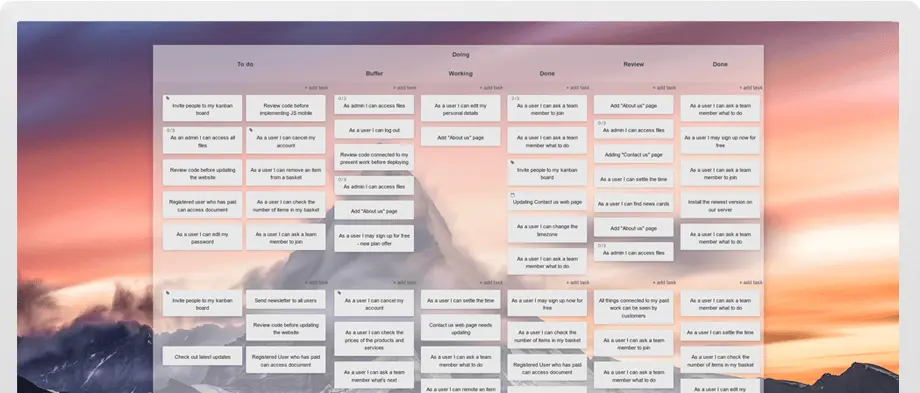
Kanban Tool is a visual project management service built around kanban boards with swimlanes, work-in-progress limits and real-time updates. Cumulative flow and cycle time reports are included on every plan, and the Enterprise plan adds time tracking and process automation. It is sold as a hosted service and as Kanban Tool On-Site, which organizations install on their own servers.
Kanban Tool has a free plan. Paid plans start at $6 per user / month. See every plan
Good for
- Teams that run kanban with WIP limits and flow metrics
- Organizations that must keep board data on their own servers
- Two-person teams whose work fits on the free plan's 2 boards
Worth knowing
- The Free plan is limited to 2 boards and 2 users and has no file attachments.
- Time tracking, process automation and user groups are only on the Enterprise plan at $11 per user / month.
- The pricing page shows one per-user monthly price; annual billing exists, but its price is not listed.
- Kanban Tool On-Site is sold in 10-user annual license packs, with pricing only on request.
Key features
- Kanban boards with swimlanes
- Work is shown as cards on boards with horizontal swimlanes, work-in-progress limits, collapsible columns and predefined, customizable board templates.
- Real-time collaboration
- Board changes appear across team devices as they happen, with comments, task assignments, email notifications and due date reminders.
- Flow analytics
- A cumulative flow diagram, cycle time reports and breakdown charts show where work is piling up. Board analytics are included on every plan.
- Time tracking and automation
- The Enterprise plan adds time tracking with time reports and process automation. Recurring and postponed tasks with reminders are also listed.
- Power-Ups
- More than 30 optional Power-Ups add an interactive calendar, task dependencies, card covers, checklists and developer tools for custom styles and scripts.
- AI Assistant
- The assistant builds a board from a description of the work and suggests checklist items and tasks, using an OpenAI integration.
Kanban Tool pricing
- Starts at
- $6 per user / month
- Free plan
- 2 boards and 2 users, with no file attachments, time tracking, process automation or user groups.
- Free trial
- 14-day free trial of the chosen plan, no credit card required
| Plan | Price | What you get |
|---|---|---|
| Free | $0 | 2 boards and 2 users, without file attachments. |
| Team | $6per user / month; annual billing also offered, price not listed | Unlimited boards and file attachments, with real-time board updates and board analytics. |
| Enterprise | $11per user / month; annual billing also offered, price not listed | Everything in Team, plus time tracking and reporting, user groups management and process automation. |
| Kanban Tool On-Site | Custom | The Enterprise product installed on your own server, sold in 10-user annual license packs with pricing on request. |
Read from kanbantool.com on Oct 9, 2026. Prices change, so confirm with Kanban Tool before you buy.
Ways to pay less
- NonprofitNonprofit pricing on request
Kanban Tool says it gives significant discounts to non-profit organizations. The amount is not published and is arranged by contacting the company.
Stated on kanbantool.com - EducationEducational pricing on request
Educational organizations are offered discounted pricing on the same terms: no published rate, arranged by contacting the company.
Stated on kanbantool.com - Other savingsReduced pricing above 50 users
The support pages state that accounts with more than 50 users get reduced pricing, arranged with the sales team.
Stated on kanbantool.com
Works with
Kanban Tool alternatives
- Kanban Tool vs KanbanFlow
Free plan · from $5/mo
- Kanban Tool vs Trello
Free plan · from $5/mo
- Kanban Tool vs Kanbanchi
Free plan · from $3.97/mo
- Kanban Tool vs Teamhood
Free trial · from $6/mo





Common questions
Is Kanban Tool free?
Kanban Tool has a free plan. 2 boards and 2 users, with no file attachments, time tracking, process automation or user groups. Paid plans start at $6 per user / month.
How much does Kanban Tool cost?
Kanban Tool lists 4 plans. Free: $0. Team: $6 per user / month; annual billing also offered, price not listed. Enterprise: $11 per user / month; annual billing also offered, price not listed. Kanban Tool On-Site: custom pricing. Prices were read from kanbantool.com on Oct 9, 2026.
What platforms does Kanban Tool work on?
Kanban Tool is available on Web, iOS and Android.
Does Kanban Tool offer any discounts?
Kanban Tool publicly lists the following: Nonprofit pricing on request; Educational pricing on request; Reduced pricing above 50 users.
Does Kanban Tool have a Windows app?
No Windows app was listed when its pages were read on Oct 9, 2026. Kanban Tool is listed for Web, iOS and Android.
Does Kanban Tool have a macOS app?
No macOS app was listed when its pages were read on Oct 9, 2026. Kanban Tool is listed for Web, iOS and Android.
Is Kanban Tool open source?
Kanban Tool is not described as open source on its own site, as read on Oct 9, 2026.
Can Kanban Tool be self-hosted?
Yes. Kanban Tool's own site says it can be run on a server of your own.
Does Kanban Tool have an API?
Yes. Kanban Tool offers a public API, according to its own site.
What does Kanban Tool integrate with?
Kanban Tool's listing names Zapier, Google Drive, OneDrive, Dropbox, Box, Outlook, OpenAI and ActiveCampaign. A listing names up to eight integrations, so it may connect to more.
Does Kanban Tool have a student discount?
Educational pricing on request. Educational organizations are offered discounted pricing on the same terms: no published rate, arranged by contacting the company.
Does Kanban Tool have a free trial?
Yes. 14-day free trial of the chosen plan, no credit card required.
Who makes Kanban Tool?
Kanban Tool is made by Kanban Tool sp. z o.o. It dates from 2008.
What are the alternatives to Kanban Tool?
The closest alternatives to Kanban Tool in our directory are KanbanFlow, Trello, Kanbanchi, Kanboard and Teamhood. Each one has a side-by-side comparison with Kanban Tool.
Sources for this page
The prices, plans, platforms and features above were read from these pages on Oct 9, 2026.