
Teamhood review (2026): is it worth $12 a month per user, billed yearly?
Project management with capacity planning in a single plan
Black Friday: is there a Teamhood sale?
Teamhood report card
Fair · out of 4.0 · graded Nov 2, 2026
Best for teams sharing the same people across many projects
Teamhood is project management for teams that share the same people across many projects, with capacity planning built from each person's hours and time off, all in one plan at $12 a user a month billed yearly, or $16 monthly. There's no free plan after the first month, a subscription needs at least 3 licenses, prices exclude VAT, single sign-on is Enterprise only, and it runs only in the browser.
Who Teamhood is for
- Fits if your engineers, architects or agency staff are shared across several projects
- Works for teams of three or more that want every view, timesheets and automation on one $12 plan
Who Teamhood is not for
- Skip it if you want a free plan, because after the free month you subscribe or the organization closes
- Not for you if you're one or two people, since a subscription needs at least 3 licenses, so $36 a month at the least
- Tight if you need single sign-on, SCIM or on-premise hosting, which are Enterprise only at a custom price
- Skip it if you want a phone or desktop app, as there's only the web app
- Watch out: prices exclude VAT, monthly billing is $16 a user, and the older Teamhood Classic is priced on a separate page with different plans
Why Teamhood gets a 2.4
Five grades, each with its reason. The GPA is their average: an A is 4 points, an F is none.
- CValue for money$12 a user a month billed yearly, $16 monthly, sits above this category's $9 middle and just past the $11 dearer quarter, short of the $25 dearest tenth, so still ordinary money. Every view, capacity planning, timesheets, automation and the API are in that one plan. At least 3 licenses, and prices exclude VAT.
- CFree plan and trialNo free plan on the current pricing page. The first month is free and asks for no card, but after it you subscribe or the organization closes. Nothing is deleted.
- BFeaturesIt covers the whole job: list, board, Gantt, schedule, mind map, timesheet and chart views on one set of items, capacity planning from each person's real hours and time off, dependencies and baselines, custom fields with formulas, and automation rules. Float and monday do much of the same.
- CEase of useNo store rating on record, and capacity planning only works once somebody has typed in weekly hours, part-time contracts and holidays for every person. One plan means no puzzling over tiers, a change in one view lands in all of them, and plans import from Microsoft Project.
- BPlatforms and integrationsWeb only, with no phone or desktop app on record, but it's wired up: a REST API with an OpenAPI document, webhooks, and an MCP server that lets Claude, ChatGPT or Copilot read and update work. The integration list is short beyond that.
What these grades rest on. Graded from this listing, whose facts were read from Teamhood's own pages on 2 November 2026. Not based on using the product, and shorter than our full reviews. How we review and grade.
Make Teamhood? Put this grade on your site

Paste this where you want the badge. It links here and follows the grade if it changes. About badges
<a href="https://toolgpa.com/tools/teamhood#review"><img src="https://toolgpa.com/badge/teamhood.svg" alt="Teamhood: 2.4 GPA on ToolGPA" width="196" height="56"></a>Where Teamhood stands among project management tools
Teamhood's GPA of 2.4 is higher than 70 of the 149 other project management tools we grade, and level with 27.
It stands best on features (B, above 76 of 149) and worst on ease of use (C, above 7).
Its paid plans start at $12 a month for each person, against a middle price of $9 for the category: 82 of the 121 others that charge start lower.
On features, ease of use and platforms it scores 2.7 out of 4. 25 tools score higher and cost less.
Each grade against the category
Every bar is all 150 project management tools we grade, cut by the letter each got. Teamhood’s own letter is outlined.
- CValue for moneyAbove 35 of 149, level with 78
- CFree plan and trialAbove 26 of 149, level with 74
- BFeaturesAbove 76 of 149, level with 68
- CEase of useAbove 7 of 149, level with 126
- BPlatforms and integrationsAbove 26 of 149, level with 95
Price against what you get
Each dot is one of 128 project management tools. Further left costs less, and higher up scores better on features, ease of use and platforms. Point at a dot to see which tool it is.
Features, ease of use and platforms, averaged
What paid plans start at, a month (each step along is roughly double) →
- The best score at each price
- Has a free plan
- No free plan
Keep Teamhood, or make your own?
Keep it
To replace Teamhood you would be making connections to other products, each kept working as those products change. That is not a weekend's work, with an AI app builder or without one.
It costs $144 a year.
What you could make
- Tasks, kanban boards, Gantt & timelines and time tracking: an app builder makes these well.
What you could not
- Connections to other products, each kept working as those products change.
- It is priced for each person, which means accounts and billing for a team.
- AI features, unless you pay a model provider for each request yourself.
- What a company asks for before it lets staff use something: single sign-on and roles and permissions.
- The depth: we grade its features B, which means it covers the whole job.
What this rests on. Teamhood’s listing: what it does, where it runs, what it plugs into and what it costs. It is a judgement about the kind of software this is. We have not built a replacement for it, and making your own means looking after it too. How we decide, and every tool’s verdict.
What is Teamhood?
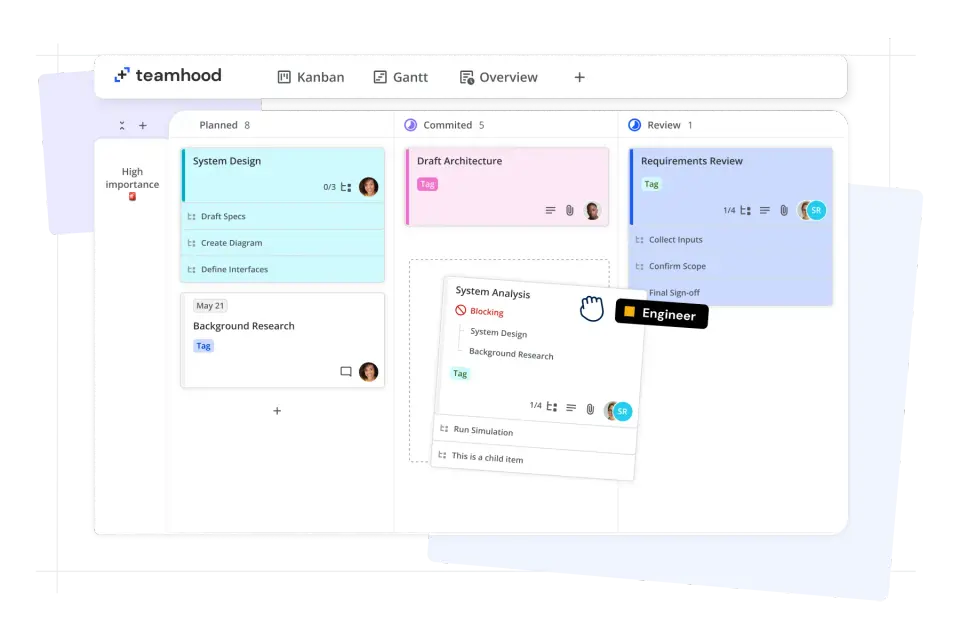
Teamhood is a project management tool for teams that run many projects with the same people. The same work items appear in list, board, Gantt, schedule, mind map, timesheet and chart views, and capacity planning uses each person's working hours and time off to show who is overbooked. Everything is sold in one per-user plan, with an Enterprise option that adds single sign-on and dedicated or on-premise hosting.
Worth knowing
- The current pricing page has no free plan: after the free month an organization must subscribe or it closes.
- A subscription needs at least 3 licenses, and listed prices exclude VAT.
- Single sign-on, SCIM and dedicated, hybrid or on-premise hosting are Enterprise only.
- The older Teamhood Classic, with a free Personal plan and Team and Business tiers, is priced on a separate page for Classic workspaces.
Key features
- One set of items, many views
- List, board, Gantt, schedule, mind map, timesheet and chart views all show the same items, so a change made in one view appears in every other.
- Capacity planning
- Weekly hours, part-time contracts, vacations and half days are set per person, and booked hours are shown against capacity across all projects.
- Gantt with dependencies
- Dependencies reschedule linked work when a task moves, hours flow around time off, and a plan can be compared against a saved baseline.
- Timesheets and time tracking
- Hours are logged in a timesheet view, and estimates, budget and tracked time add up from tasks to the project level.
- Custom types, fields and automation
- Custom item types and fields, formula and roll-up fields and automation rules let a team model programs, phases and roles the way it plans them.
- MCP server, REST API and webhooks
- An MCP server lets assistants such as Claude, ChatGPT or Copilot find and update work within the user's permissions. A REST API with an OpenAPI document and webhooks serve other systems.
Teamhood pricing
As of Nov 2, 2026, Teamhood is a paid product with a free trial, starting at $12 per user / month, billed yearly (minimum 3 users).
- Starts at
- $12 per user / month, billed yearly (minimum 3 users)
- Free plan
- None
- Free trial
- First month free, no credit card; if you do not subscribe the organization closes, but nothing is deleted
| Plan | Price | What you get |
|---|---|---|
| Teamhood | $12per user / month, billed yearly; $16 billed monthly | Every feature in one plan: all views, capacity planning, timesheets, automation rules, the REST API and the MCP server. At least 3 licenses. Also listed as €11 and €14. |
| Enterprise | Custom | Adds single sign-on, SCIM user provisioning, dedicated, hybrid or on-premise hosting, onboarding help and invoice billing under a custom agreement. |
Read from teamhood.com on Nov 2, 2026. Prices change, so confirm with Teamhood before you buy.
Ways to pay less
- Annual discountLower price with yearly billing
Yearly billing is $12 per user a month against $16 billed monthly (€11 against €14), a saving of 25% in dollars.
Stated on teamhood.com
Works with
Jobs at UAB Eylean
Any open roles at UAB Eylean are on its own careers page. We can’t read a count from there, so have a look.
Applications go to UAB Eylean, not to us.
Teamhood alternatives
- Teamhood vs Asana
Free plan · from $10.99/mo
- Teamhood vs monday.com
Free plan · from $9/mo
- Teamhood vs Microsoft Project
Free trial · from $30.00/mo
- Teamhood vs Trello
Free plan · from $5/mo
- Teamhood vs Float
Free trial · from $7/mo





Common questions
Does Teamhood have an Android app?
No Android app was listed when its pages were read on Nov 2, 2026. Teamhood is listed for Web.
Does Teamhood have an iPhone app?
No iPhone app was listed when its pages were read on Nov 2, 2026. Teamhood is listed for Web.
Is Teamhood open source?
Teamhood is not described as open source on its own site, as read on Nov 2, 2026.
Does Teamhood have an API?
Yes. Teamhood offers a public API, according to its own site.
Sources for this page
The prices, plans, platforms and features above were read from these pages on Nov 2, 2026.
- teamhood.com/pricing/
- teamhood.com
- teamhood.com/pricing/classic/
- teamhood.com/deployment-and-hosting/
- teamhood.com/product/teamhood-ai/
- teamhood.com/frequently-asked-questions/
- help.teamhood.com/
- help.teamhood.com/subscription/subscribe-or-change-your-subscription/
- help.teamhood.com/subscription/seats-and-members/
- help.teamhood.com/subscription/what-happens-when-a-subscription-lapses/
- help.teamhood.com/integrations/connect-mcp/
- help.teamhood.com/get-started/import-a-plan-from-ms-project/