
Teamwork.com review (2026): is the free plan enough?
Project and resource management for client service teams
Black Friday: is there a Teamwork.com sale?
Teamwork.com report card
Fair · out of 4.0 · graded Oct 10, 2026
Best for agencies that bill clients for tracked time
Teamwork.com is project management for people who bill clients, where time logged on tasks feeds budgets, invoices and profit reports. The free plan stops at 5 users, 5 projects and 100 MB, Basics needs 3 users at $9.99 each, and workload planning and invoicing wait for Accelerate at $24.99 with a 5-user minimum. Optimize and Enterprise have no published price.
Who Teamwork.com is for
- Fits if you're an agency or consultancy billing clients for tracked time
- Works for groups of up to 5 who can start on the Free plan with 5 projects
Who Teamwork.com is not for
- Pricey if you want invoicing and workload planning, which start at $24.99 a user with a 5-user minimum
- Tight if you're staying free, since it stops at 5 users, 5 projects and 100 MB of files
- Not for you if you're one or two people, as Basics needs at least 3 seats at $9.99 each
- Watch out: Optimize and Enterprise have no published price, and single sign-on needs Enterprise or a separate add-on
- Watch out: the Windows and Mac desktop apps don't work offline
Why Teamwork.com gets a 2.4
Five grades, each with its reason. The GPA is their average: an A is 4 points, an F is none.
- DValue for moneyBasics is $9.99 a user a month billed yearly, already the dear end here, $13.99 if you pay monthly, with a 3-user minimum. Worse, the parts you came for, workload planning, retainers and invoices built from logged time, need Accelerate at $24.99, three times the $8 middle.
- CFree plan and trialFree for up to 5 users with all four views, time logging and 100 automations, but the caps arrive fast: 5 projects and 100 MB of file storage, which a few client decks will eat. Paid plans get 14 days with no card.
- BFeaturesIt covers the whole job and the money side with it: lists, boards, tables and Gantt charts on every plan, billable time, invoices built from it, budgets, retainers, workload and capacity planning, intake forms and automations. Productive and Scoro, its own named rivals, do the same.
- CEase of useNo store rating on record, and there's a fair bit to arrange: projects, templates, billable rates and automations before the reports say anything useful. The plans themselves take reading too, with seat minimums and automation caps changing at every step.
- APlatforms and integrationsThe full set: web, Mac, Windows, iPhone, Android and a browser extension, with Slack, HubSpot, QuickBooks, Salesforce, NetSuite and Harvest wired in, plus Claude and ChatGPT. One catch: the desktop apps don't work offline.
What these grades rest on. Graded from this listing, whose facts were read from Teamwork.com's own pages on 5 October 2026. Also tested with a demo account on 2026-08-01. How we review and grade.
Make Teamwork.com? Put this grade on your site

Paste this where you want the badge. It links here and follows the grade if it changes. About badges
<a href="https://toolgpa.com/tools/teamwork#review"><img src="https://toolgpa.com/badge/teamwork.svg" alt="Teamwork.com: 2.4 GPA on ToolGPA" width="196" height="56"></a>Where Teamwork.com stands among project management tools
Teamwork.com's GPA of 2.4 is higher than 70 of the 149 other project management tools we grade, and level with 27.
It stands best on platforms and integrations (A, above 122 of 149) and worst on value for money (D, above 1).
Its paid plans start at $9.99 a month for each person, against a middle price of $9 for the category: 68 of the 121 others that charge start lower.
On features, ease of use and platforms it scores 3.0 out of 4. 4 tools score higher and cost less.
Each grade against the category
Every bar is all 150 project management tools we grade, cut by the letter each got. Teamwork.com’s own letter is outlined.
- DValue for moneyAbove 1 of 149, level with 33
- CFree plan and trialAbove 26 of 149, level with 74
- BFeaturesAbove 76 of 149, level with 68
- CEase of useAbove 7 of 149, level with 126
- APlatforms and integrationsAbove 122 of 149, level with 27
Price against what you get
Each dot is one of 128 project management tools. Further left costs less, and higher up scores better on features, ease of use and platforms. Point at a dot to see which tool it is.
Features, ease of use and platforms, averaged
What paid plans start at, a month (each step along is roughly double) →
- The best score at each price
- Has a free plan
- No free plan
Keep Teamwork.com, or make your own?
Keep it
To replace Teamwork.com you would be making connections to other products, each kept working as those products change. That is not a weekend's work, with an AI app builder or without one.
It costs $119.88 a year.
What you could make
- Tasks, kanban boards, Gantt & timelines, time tracking and invoicing: an app builder makes these well.
What you could not
- Connections to other products, each kept working as those products change.
- Apps for macOS, Windows, iOS and Android that stay in step with each other.
- It is priced for each person, which means accounts and billing for a team.
- AI features, unless you pay a model provider for each request yourself.
- The depth: we grade its features B, which means it covers the whole job.
What this rests on. Teamwork.com’s listing: what it does, where it runs, what it plugs into and what it costs. It is a judgement about the kind of software this is. We have not built a replacement for it, and making your own means looking after it too. How we decide, and every tool’s verdict.
What is Teamwork.com?
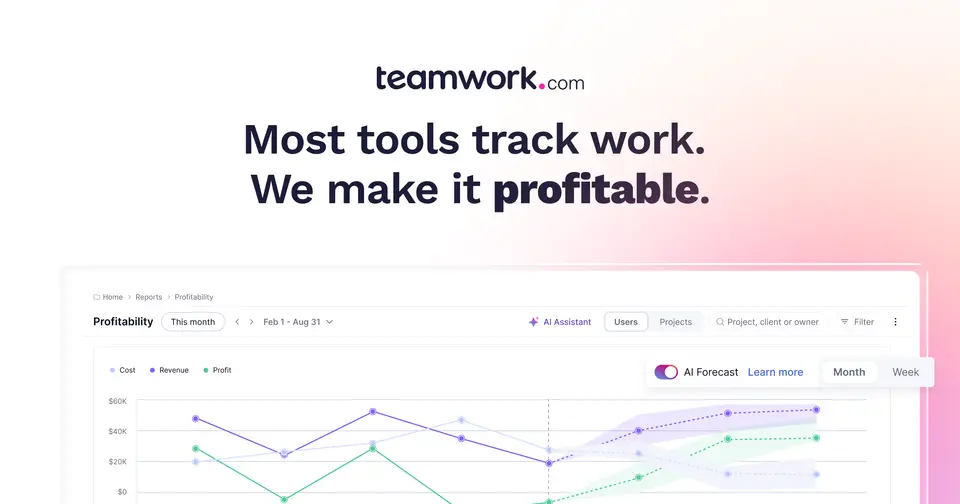
Teamwork.com is project management and professional services automation software aimed at agencies, consultancies and other teams that bill clients. Projects can be worked as lists, boards, tables or Gantt charts, and time logged against tasks feeds budgets, invoices and profitability reports. Higher plans add workload and capacity planning, quotes and resource scheduling by role or skill.
Worth knowing
- Paid plans have seat minimums: 3 users on Basics and 5 on Accelerate.
- The Free plan stops at 5 users, 5 projects and 100 MB of file storage.
- Optimize and Enterprise have no published price, and single sign-on is limited to Enterprise or a separate add-on.
- The Windows and macOS desktop apps do not support offline use, according to Teamwork.com's support site.
Key features
- List, board, table and Gantt views
- Projects can be worked as a task list, a kanban board, a table or a Gantt chart on every plan, including Free.
- Time tracking and invoicing
- Time is logged against tasks as billable or non-billable. Basics reports on billable time, and Accelerate builds client invoices from the time logged.
- Workload and capacity planning
- From Accelerate, managers plan team workloads and see live capacity. Optimize adds tentative projects and scheduling by role or skill.
- Budgets and profitability
- Accelerate handles time budgets and retainers. Optimize adds quotes, multi-currency financial budgets and revenue, cost and profitability insights.
- Automations and intake forms
- Automations are capped by plan: 100 on Free, 5,000 on Basics, 20,000 on Accelerate and 100,000 on Optimize. Intake forms for work requests start at Accelerate.
- TeamworkAI
- AI summaries, a project and task wizard and assistants such as Scout and Flo are included in paid plans for an introductory period, with usage-based AI credits to follow.
Teamwork.com pricing
As of Oct 5, 2026, Teamwork.com has a free plan, and paid plans start at $9.99 per user / month, billed yearly (3-user minimum).
- Starts at
- $9.99 per user / month, billed yearly (3-user minimum)
- Free plan
- Up to 5 users and 5 projects, 100 MB of file storage, 100 automations, time logging, and list, board, table and Gantt views.
- Free trial
- 14-day free trial of paid plans, no credit card required
| Plan | Price | What you get |
|---|---|---|
| Free | $0 | Up to 5 users and 5 projects, 100 MB of storage, 100 automations, time logging, and list, board, table and Gantt views. |
| Basics | $9.99per user / month, billed yearly ($13.99 billed monthly) | Minimum 3 users. 300 projects, 100 GB of storage, unlimited project templates, and billable time tracking and reporting. |
| Accelerate | $24.99per user / month, billed yearly ($29.99 billed monthly) | Minimum 5 users. 600 projects, intake forms, 20,000 automations, workload and capacity planning, retainers, and invoices built from logged time. |
| Optimize | Custom | Unlimited projects, quotes, 100,000 automations, resource scheduling by role or skill, financial budgets and profitability reporting. |
| Enterprise | Custom | Everything in Optimize plus single sign-on, advanced security controls, a dedicated success manager and priority support. |
Read from teamwork.com on Oct 5, 2026. Prices change, so confirm with Teamwork.com before you buy.
Ways to pay less
- Annual discountSave about 29% with yearly billing
The pricing page advertises a 29% saving for annual billing: Basics is $9.99 per user / month billed yearly against $13.99 billed monthly. On Accelerate the gap is $24.99 against $29.99.
Stated on teamwork.com - StartupsTeamwork.com products free for one year
Teamwork for Startups gives approved startups the Basics plan, or its equivalent, of each product free for one year. Eligibility depends on time in business, revenue and employee numbers.
Stated on teamwork.com
Works with
Jobs at Teamwork.com
Any open roles at Teamwork.com are on its own careers page. We can’t read a count from there, so have a look.
Applications go to Teamwork.com, not to us.
Teamwork.com alternatives
- Teamwork.com vs Productive
Free trial · from $10/mo
- Teamwork.com vs Scoro
Free trial · from $17/mo
- Teamwork.com vs Asana
Free plan · from $10.99/mo
- Teamwork.com vs ClickUp
Free plan · from $9/mo
- Teamwork.com vs Wrike
Free plan · from $10/mo





Common questions
Does Teamwork.com have a Linux app?
No Linux app was listed when its pages were read on Oct 5, 2026. Teamwork.com is listed for Web, macOS, Windows, iOS and Android.
Is Teamwork.com open source?
Teamwork.com is not described as open source on its own site, as read on Oct 5, 2026.
Sources for this page
The prices, plans, platforms and features above were read from these pages on Oct 5, 2026.