
Hive review (2026): is the free plan enough?
AI-assisted project management with chat, notes and proofing
Black Friday: is there a Hive sale?
Hive report card
Fair · out of 4.0 · graded Oct 10, 2026
Best for tasks, chat and notes in one place
Hive puts projects, tasks, chat, notes and email in one workspace, with an AI assistant called Buzz on top. Starter is $5 a user a month billed yearly but stops at 10 members and 10 projects. Larger teams land on Teams at $12, where proofing, timesheets, resourcing, external users and SSO are still paid add-ons, and the free plan has 200 MB of storage for everyone.
Who Hive is for
- Fits if you want chat, notes and email in the same place as your tasks
- Works for groups of up to 10 people, who fit on Free or Starter
Who Hive is not for
- Pricey if you're more than 10 people, as that means Teams at $12 a user plus whatever add-ons you need
- Watch out: proofing, timesheets, resourcing, external users and SSO are add-ons on Teams, and the API is listed with Enterprise
- Tight if you're staying free and share files, with 200 MB of storage for the whole workspace and no Gantt view
- Skip it if you need time tracking, forms, portfolios or custom fields on a low plan, since all of them wait on Teams
- Tight if you pick Starter, which stops at 10 members and 10 projects
Why Hive gets a 2.4
Five grades, each with its reason. The GPA is their average: an A is 4 points, an F is none.
- DValue for moneyStarter is $5 a user a month billed yearly, but it caps you at 10 members and 10 projects. Everything a team needs, time tracking, forms, portfolios, custom fields, sits on Teams at $12, half again the category's middle price, and proofing, timesheets, resourcing and SSO are add-ons listed at $5 each on top.
- CFree plan and trialFree covers up to 10 workspace members with unlimited tasks and notes, chat, email in Hive and 1,000 AI credits a month. Storage is 200 MB for the entire workspace, which a few attachments will finish off, and there's no Gantt view.
- BFeaturesKanban, Gantt, timeline, calendar, table and portfolio views, with chat, notes and email built in, automations for repeatable steps and Buzz to draft workflows and summarise. The job is covered; it's just carved up across plans and add-ons, with time tracking from Teams and proofing extra.
- CEase of useNo store rating on record. Having chat, notes and email beside your tasks does save app-hopping, but you still build the workspace yourself, and working out which add-ons you actually need is a job in itself.
- APlatforms and integrationsWeb, Mac, Windows, iPhone and Android, with Slack, Zoom, Google Drive, Microsoft Teams, Jira, GitHub, QuickBooks and Dropbox on the integrations page. The API is listed with Enterprise.
What these grades rest on. Graded from this listing, whose facts were read from Hive's own pages on 5 October 2026. Also tested with a demo account on 2026-08-10. How we review and grade.
Make Hive? Put this grade on your site

Paste this where you want the badge. It links here and follows the grade if it changes. About badges
<a href="https://toolgpa.com/tools/hive#review"><img src="https://toolgpa.com/badge/hive.svg" alt="Hive: 2.4 GPA on ToolGPA" width="196" height="56"></a>Where Hive stands among project management tools
Hive's GPA of 2.4 is higher than 70 of the 149 other project management tools we grade, and level with 27.
It stands best on platforms and integrations (A, above 122 of 149) and worst on value for money (D, above 1).
Its paid plans start at $5 a month for each person, against a middle price of $9 for the category: 17 of the 121 others that charge start lower.
On features, ease of use and platforms it scores 3.0 out of 4. Nothing scores higher for less, though at least one tool matches that score at a lower price.
Each grade against the category
Every bar is all 150 project management tools we grade, cut by the letter each got. Hive’s own letter is outlined.
- DValue for moneyAbove 1 of 149, level with 33
- CFree plan and trialAbove 26 of 149, level with 74
- BFeaturesAbove 76 of 149, level with 68
- CEase of useAbove 7 of 149, level with 126
- APlatforms and integrationsAbove 122 of 149, level with 27
Price against what you get
Each dot is one of 128 project management tools. Further left costs less, and higher up scores better on features, ease of use and platforms. Point at a dot to see which tool it is.
Features, ease of use and platforms, averaged
What paid plans start at, a month (each step along is roughly double) →
- The best score at each price
- Has a free plan
- No free plan
Keep Hive, or make your own?
Keep it
To replace Hive you would be making chat that a whole team counts on staying up. That is not a weekend's work, with an AI app builder or without one.
It costs $60 a year.
What you could make
- Tasks, kanban boards, Gantt & timelines and time tracking: an app builder makes these well.
What you could not
- Chat that a whole team counts on staying up.
- Connections to other products, each kept working as those products change.
- Apps for macOS, Windows, iOS and Android that stay in step with each other.
- It is priced for each person, which means accounts and billing for a team.
- AI features, unless you pay a model provider for each request yourself.
- What a company asks for before it lets staff use something: single sign-on.
- The depth: we grade its features B, which means it covers the whole job.
What this rests on. Hive’s listing: what it does, where it runs, what it plugs into and what it costs. It is a judgement about the kind of software this is. We have not built a replacement for it, and making your own means looking after it too. How we decide, and every tool’s verdict.
What is Hive?
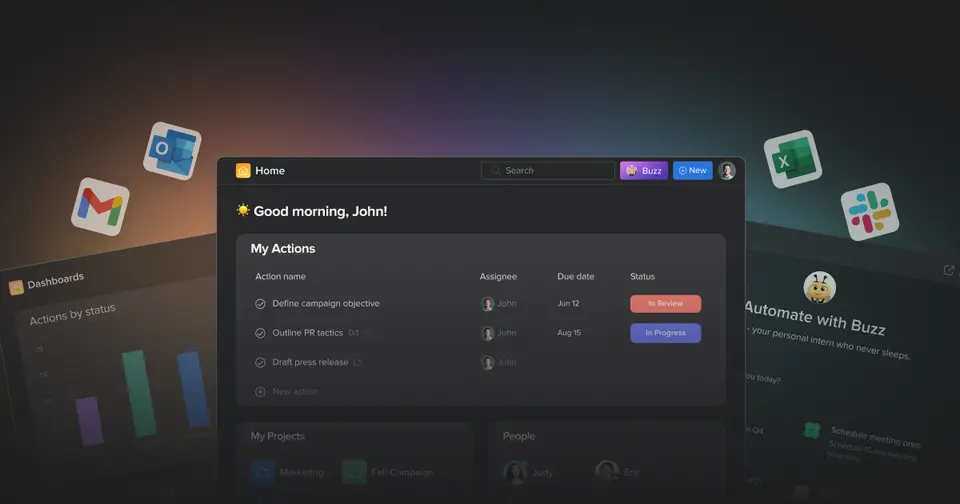
Hive is a project and work management platform that keeps projects, tasks, chat, notes, email and proofing in one workspace. Work can be viewed as Kanban, Gantt, calendar, table and portfolio layouts, and workflows automate repeatable steps. An in-workspace AI assistant called Buzz draws on a monthly credit allowance. There is a free plan for up to 10 members, and several capabilities are sold as paid add-ons.
Worth knowing
- Free and Starter are both capped at 10 workspace members, and Starter is also limited to 10 projects.
- Proofing, timesheets, resourcing, dashboards, external users and SSO are Teams add-ons included in Enterprise; Hive CRM is a separate $29 per seat / month add-on.
- The Free plan has 200 MB of storage and no Gantt view.
- Time tracking, shareable forms, portfolios and custom fields need the Teams plan.
Key features
- Flexible project views
- Projects and tasks can be shown as Kanban, Gantt, timeline, calendar, table, list and portfolio views. Gantt view starts on Starter and portfolios on Teams.
- Buzz AI assistant
- Buzz is an AI assistant inside the workspace that sets up workflows, summarizes work data and analyzes proofs. Plans include 1,000 to 5,000 AI credits a month.
- Chat, notes and email
- Native chat messaging, collaborative notes and email inside Hive are part of every plan, including Free.
- Workflows and automations
- Automations run repeatable steps, such as sending a Slack message or creating a project when the status of an action changes.
- Time tracking and resourcing
- Time tracking is included from the Teams plan. Timesheets and hour-by-hour team resourcing are optional add-ons, listed at $5 each in the Teams price calculator.
- Proofing and approvals
- An add-on for proofing, marking up and approving documents. External users, advanced dashboards and SSO are sold the same way on the Teams plan.
Hive pricing
As of Nov 16, 2026, Hive has a free plan, and paid plans start at $5 per user / month, billed yearly.
- Starts at
- $5 per user / month, billed yearly
- Free plan
- Up to 10 workspace members, 200 MB of storage, 1,000 AI credits a month, unlimited tasks and notes, email in Hive and chat.
- Free trial
- 14-day free trial with access to all features, no credit card required
| Plan | Price | What you get |
|---|---|---|
| Free | $0 | Up to 10 workspace members, 200 MB of storage, 1,000 AI credits a month, unlimited tasks and collaborative notes, email in Hive and chat. |
| Starter | $5per user / month, billed yearly ($7 billed monthly) | Up to 10 members and 10 projects, unlimited storage, 3,000 AI credits a month, Gantt view, in-app calendar, and Zoom and Slack from Hive. |
| Teams | $12per user / month, billed yearly ($18 billed monthly) | Unlimited members, 5,000 AI credits a month, shareable forms, time tracking, portfolios, and custom fields, labels and statuses. Add-ons cost extra. |
| Enterprise | Custom | Custom AI credits, add-ons included, enhanced security and permission controls, an Enterprise API and a dedicated customer success manager. |
Read from hive.com on Nov 16, 2026. Prices change, so confirm with Hive before you buy.
Ways to pay less
- Annual discountSave up to 33% with yearly billing
Teams is $12 per user / month billed yearly against $18 billed monthly, the 33% saving the pricing page advertises. Starter is $5 against $7.
Stated on hive.com - NonprofitNonprofit discount on Hive Teams
Hive's pricing FAQ says non-profit teams are eligible for a discount on the Teams plan. The amount is not published and has to be requested from Hive.
Stated on hive.com - By countryLower price shown to buyers in India
Read 16 November 2026: loaded in a browser from India, the pricing page shows Teams at $6 and Starter at $3 per user / month billed yearly, against $12 and $5 in the US version.
Stated on hive.com
Works with
Hive alternatives
- Hive vs Asana
Free plan · from $10.99/mo
- Hive vs monday.com
Free plan · from $9/mo
- Hive vs ClickUp
Free plan · from $9/mo
- Hive vs Wrike
Free plan · from $10/mo
- Hive vs Smartsheet
Free trial · from $9/mo





Common questions
Does Hive have a Linux app?
No Linux app was listed when its pages were read on Nov 16, 2026. Hive is listed for Web, macOS, Windows, iOS and Android.
Is Hive open source?
Hive is not described as open source on its own site, as read on Nov 16, 2026.
Sources for this page
The prices, plans, platforms and features above were read from these pages on Nov 16, 2026.