HubSpot review (2026): is the free plan enough?
Free CRM at the center of a marketing, sales and service suite
Black Friday: is there a HubSpot sale?

Our verdict
First of our top three CRM tools
For: Most small businesses
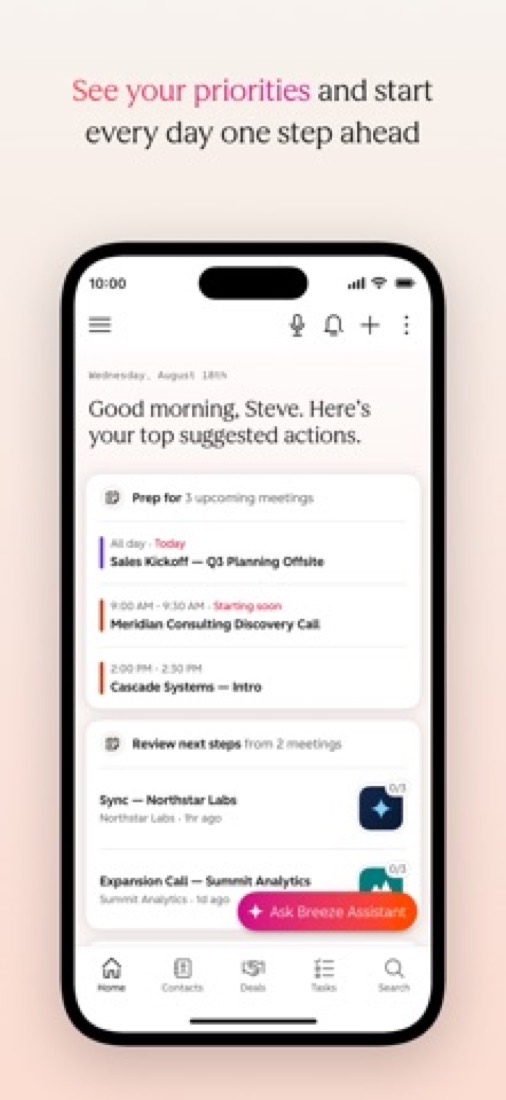
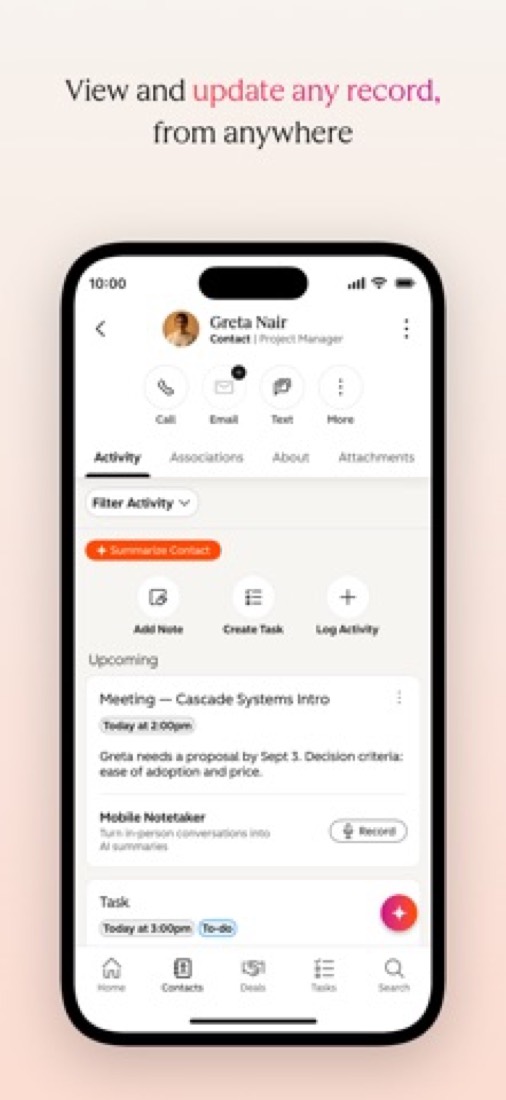
HubSpot's CRM is free for up to 2 users and 1,000 contacts with no expiry date, and the free tools cover contact management, deal pipelines, tasks, email tracking, live chat, a meeting link and reporting dashboards. It runs in a browser and on iPhone and Android, with a Chrome extension for Gmail, and shares one customer database with HubSpot's marketing and service hubs. Its iPhone and iPad app averages 4.7 from about 15,700 ratings. Know the limits: the Starter bundle lists at $20 per seat a month, with new customers offered it from $7, billed annually, for a limited time, and Sales Hub Professional is $90 per seat a month on an annual commitment plus a one-time $1,500 onboarding fee.
See all three and how we rankHubSpot review
Very good · out of 4.0 · graded Oct 10, 2026
Best for small businesses starting with a free CRM
HubSpot is a CRM with marketing, sales and service hubs on top, and its free tools cover 2 users and 1,000 contacts with no end date. Free puts HubSpot's logo on your chat and emails, Starter's $7 offer sits against a $20 list price and a $15 figure on another page, and Sales Hub Professional is $90 a seat plus $1,500 onboarding. Past 1,000 contacts, price up the alternatives first.
Who HubSpot is for
- Fits if there are one or two of you with under 1,000 contacts and you want to pay nothing
- Works for teams that want sales, marketing and support on the same customer record
Who HubSpot is not for
- Skip it if you're past 1,000 contacts or 2 users and won't pay, because that's where free stops
- Pricey if you need sequences and custom workflows: Sales Hub Professional is $90 a seat plus $1,500 up front
- Not for you if you want one plain price: it's bundles, hubs, seat types and credits that don't roll over
- Watch out: the $7 Starter offer is for new customers against a $20 list price, and another page says from $15
- Tight if you sell on the road, as reviewers say the phone app does less than the website and there's no desktop app
Why HubSpot gets a 3.2
Five grades, each with its reason. The GPA is their average: an A is 4 points, an F is none.
- CValue for moneyStarter lists at $20 a seat, mid-pack for the CRMs here, and new customers get it from $7. Then it jumps: Sales Hub Professional is $90 a seat plus a one-time $1,500 onboarding fee, when Zoho CRM starts at $14 a user. Mid-priced at the bottom, dear at the top.
- BFree plan and trialFree with no end date for 2 users and 1,000 contacts, with deal pipelines, email tracking, live chat, a meeting link and dashboards. But 1,000 contacts is a wall you'll hit, and HubSpot's logo sits on your chat and marketing emails.
- AFeaturesThe CRM job, then marketing, service and content tools all reading from the same customer record; no other CRM here covers all four. Email tracking, calling, workflows, dashboards, an AI assistant and more than 2,000 integrations. Much of it is locked to paid tiers.
- AEase of use4.7 from about 15,700 App Store ratings, the highest score among the CRMs here with that many ratings. It runs in a browser with nothing to install, and adding a contact fills in the company details for you.
- BPlatforms and integrationsWeb, iPhone and Android, with a Chrome extension for Gmail and an add-in for Outlook, but no desktop app. More than 2,000 integrations and an API, the longest list in this category.
The good
So why do so many small businesses start with HubSpot? The free CRM has no end date.
Two of you can keep up to 1,000 contacts in it. You get a board for your deals, tasks, dashboards, live chat for your website and a link people can use to book a meeting with you.
Email tracking is the bit reviewers mention most. Send a quote from Gmail or Outlook and HubSpot tells you when it's opened.
Add a contact and it fills in the company details from the web address.
Around the CRM sit marketing emails, forms and a help desk for support tickets, all reading from the same customer record. So whoever picks up a complaint can see what sales promised that customer.
HubSpot lists more than 2,000 integrations, and there's an API.
The stuff that'll bug you
The price ladder. Free to Starter is a small step. Starter to Professional is a cliff!
Sales Hub Professional is $90 a seat a month on an annual commitment, and you have to buy onboarding for a one-time $1,500. For five people that's $6,900 in the first year. Enterprise is $150 a seat with $3,500 for onboarding.
It's hard to tell what you're buying, too. There's a Starter bundle, a CRM-only plan called Smart CRM, and separate hubs for sales, marketing and service. Seats come in different kinds. The AI agents run on credits that reset every month and don't roll over.
The Starter price doesn't agree with itself. The list price is $20, new customers are offered $7 for a limited time, and HubSpot's CRM product page says from $15. The lowest numbers all mean signing up for a year.
The free plan has its limits. HubSpot's logo sits on your live chat and marketing emails. Its own product catalog allows 3 email templates and 200 email-open alerts a month. Free users get the community forum and help articles, not a support team.
The phone app does less than the website, and there's no desktop app. Reviewers have said so for years. Two from 2022 couldn't book a meeting or get to tickets from it, so some of that may be fixed by now.
Money
The free tools need no card and have no time limit. There's also a 14-day trial of the paid sales tools.
Starter comes next. The list price is $20 a seat a month. Right now new customers get it from $7 a seat billed yearly, or $10 billed monthly, and HubSpot gives no end date for that offer. It takes the HubSpot branding off and includes 500 HubSpot Credits a month for the AI agents.
After that it forks. Only want the CRM? Smart CRM Professional is $45 a seat on an annual commitment, or $50 monthly. Enterprise is $75.
Want the full sales tools? Sales Hub Professional is $90 a seat on an annual commitment, or $100 monthly, plus the $1,500 onboarding fee. Enterprise is $150 a seat, with $3,500 for onboarding.
There are two discounts. Startups with funding up to Series A can get 90% off in year one, and eligible nonprofits get 40% off. Both cover Professional and Enterprise only.
We'd stay on free or Starter until something specific forces the jump, and price up Zoho CRM first, which starts at $14 a user.
What actual users say
HubSpot has 4.7 on the App Store from about 15,700 ratings. Around 86% of those are five stars.
The positive ones mostly come from small firms on the free plan. One says it was their first CRM and they don't expect to need another. Another came from a company CRM that kept crashing, and says they're staying as long as the price holds.
What do they mention? Seeing when an email's been opened. Scanning a business card straight into a contact. Company details that fill themselves in.
The complaints are mostly about the phone app. A field salesperson said in 2022 that it suits selling from a desk, and to keep looking if you're on the road four days a week.
Hacker News is cooler on it. It turns up on CVs and in job ads all the time. But when people talk about the product, they talk about cost. One developer built their own outreach tool because HubSpot was too expensive. Another pointed at the gap between Starter and Professional.
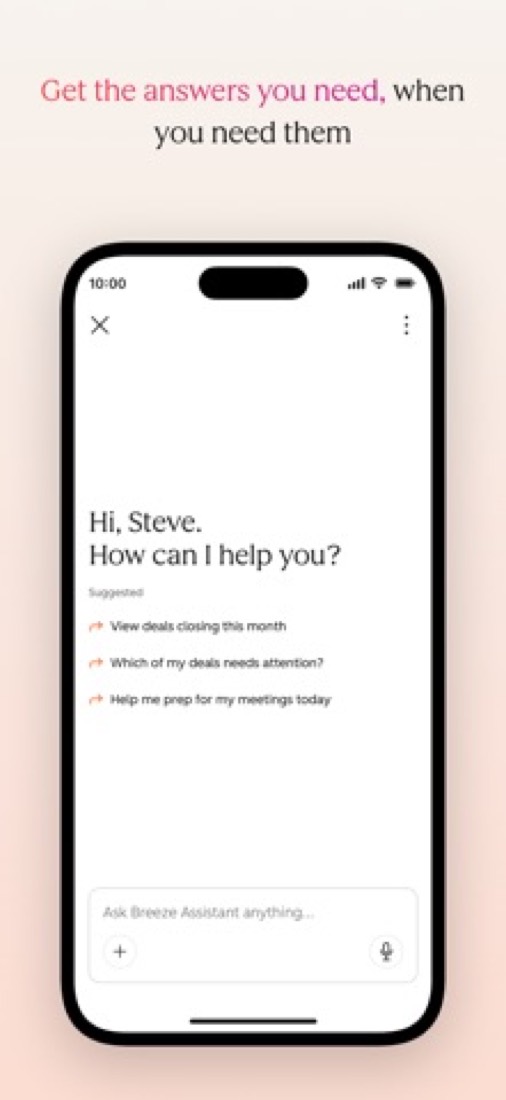
A newer group reaches their HubSpot deals and reports through an AI assistant.
What this review rests on. Based on HubSpot's free CRM, Starter, Sales Hub and mobile app pages, its product catalogue and a help article as of 9 October 2026, its App Store reviews and Hacker News comments about it. Its three pricing pages would not load, so prices were checked against the pages above. Also tested with a demo account on 2026-06-25. How we review and grade.
Make HubSpot? Put this grade on your site
Paste this where you want the badge. It links here and follows the grade if it changes. About badges
<a href="https://toolgpa.com/tools/hubspot#review"><img src="https://toolgpa.com/badge/hubspot.svg" alt="HubSpot: 3.2 GPA on ToolGPA" width="196" height="56"></a>Where HubSpot stands among CRM tools
HubSpot's GPA of 3.2 is higher than 116 of the 116 other CRM tools we grade.
It stands best on ease of use (A, above 115 of 116) and worst on value for money (C, above 37).
Its paid plans start at $20 a month for each person, against a middle price of $29 for the category: 30 of the 93 others that charge start lower.
On features, ease of use and platforms it scores 3.7 out of 4, and no tool on the category's chart scores higher without costing more.
Each grade against the category
Every bar is all 117 CRM tools we grade, cut by the letter each got. HubSpot’s own letter is outlined.
- CValue for moneyAbove 37 of 116, level with 63
- BFree plan and trialAbove 98 of 116, level with 17
- AFeaturesAbove 113 of 116, level with 3
- AEase of useAbove 115 of 116, level with 1
- BPlatforms and integrationsAbove 24 of 116, level with 85
Price against what you get
Each dot is one of 95 CRM tools. Further left costs less, and higher up scores better on features, ease of use and platforms. Point at a dot to see which tool it is.
Features, ease of use and platforms, averaged
What paid plans start at, a month (each step along is roughly double) →
- The best score at each price
- Has a free plan
- No free plan
Keep HubSpot, or make your own?
Keep it
To replace HubSpot you would be making email sent in volume that still reaches the inbox. That is not a weekend's work, with an AI app builder or without one.
It is one of the better ones too: its GPA of 3.2 is higher than 116 of the 116 other CRM tools we grade. It costs $240 a year.
What you could make
- Sales pipeline: an app builder makes this well.
What you could not
- Email sent in volume that still reaches the inbox.
- Connections to other products, each kept working as those products change.
- Booking pages that read and write other people's calendars and send the emails.
- A real app for iOS and Android. Something home-made would be a web page.
- It is priced for each person, which means accounts and billing for a team.
- AI features, unless you pay a model provider for each request yourself.
- The depth: we grade its features A, which means it covers the whole job.
What this rests on. HubSpot’s listing: what it does, where it runs, what it plugs into and what it costs. It is a judgement about the kind of software this is. We have not built a replacement for it, and making your own means looking after it too. How we decide, and every tool’s verdict.
What is HubSpot?
HubSpot is a customer platform built around a shared CRM, with separate hubs for marketing, sales, service, content and data layered on top. The CRM itself is free for up to 2 users and 1,000 contacts and covers contacts, deal pipelines, tasks, email tracking and reporting dashboards. Paid tiers are sold per seat as a Starter bundle, as Smart CRM, or hub by hub, such as Sales Hub.
Worth knowing
- The free tools stop at 2 users and 1,000 contacts, and free live chat and marketing emails carry HubSpot branding.
- Sales Hub Professional and Enterprise each require a one-time onboarding fee ($1,500 and $3,500) on top of the seat price.
- Paid tiers are split across a Starter bundle, Smart CRM and separate hubs, so the total depends on which products and how many seats you buy.
- The $7 Starter price is a limited-time offer for new customers against a $20 list price, and HubSpot's CRM product page shows a different new-customer price, from $15 per seat.
Key features
- Free CRM tools
- Contact management, deal pipelines, task and activity tracking, CRM import and reporting dashboards are free for up to 2 users and 1,000 contacts, with no expiry date.
- Sales email and meeting tools
- Email tracking, templates and a meeting scheduler work inside HubSpot or from the inbox, through a Chrome extension for Gmail and an Office 365 add-in for Outlook.
- Workflows and sales automation
- Workflows automate follow-ups and record updates. Sales Hub Professional allows up to 300 fully customizable workflows; lower tiers have fewer triggers and actions.
- Breeze AI and HubSpot Credits
- Breeze Assistant answers questions from CRM data, and agents run on HubSpot Credits. Paid tiers include 500, 3,000 or 5,000 credits a month, and unused credits do not roll over.
- Calling and conversation tools
- Calls can be placed and logged from the CRM, with a monthly allowance of calling minutes that grows by tier. Sales Hub Professional adds call transcription and playbooks.
- Connected hubs and integrations
- The CRM shares one customer database with HubSpot's marketing, service, content and data hubs, and HubSpot lists more than 2,000 integrations.
HubSpot tips most people miss
Pay less
Give read-only colleagues a free View-Only seat
HubSpot's seats page says View-Only seats are free and unlimited on Starter, Professional and Enterprise. They can look at records, dashboards and reports and leave notes, but can't edit records or log email. Perfect for the boss who only wants the numbers.
knowledge.hubspot.comSetting
Set a cap on marketing contacts before your first big import
Go over your marketing contact tier by even one contact and HubSpot moves you up a tier until renewal, and it never moves you back down by itself. A Super Admin can set a maximum under Account & Billing > Marketing Contacts, so contacts past it are saved as non-marketing.
knowledge.hubspot.comRenewal
Turn off auto-renewal yourself, because you can't cancel mid-term
Paid plans renew automatically and mid-contract cancellations aren't allowed, so a 12-month contract is paid in full even if you stop after eight. A Super Admin or billing admin turns it off under Account & Billing > Subscriptions > Cancel auto-renewal. You drop to the free tools when the term ends.
knowledge.hubspot.comRenewal
Ask for a downgrade at least five business days before renewal
Fewer seats, fewer contacts or a lower tier only take effect at renewal, never mid-contract. HubSpot wants at least five business days' notice: Starter customers send a support ticket, Professional and Enterprise customers go through their Contract Manager. Leave it later and you may renew as you are.
knowledge.hubspot.comLeaving
Export reports and knowledge base articles before you downgrade
Drop to Starter or the free tools and you can't view existing custom reports, and HubSpot-made CTAs stop working. Leave Service Hub Professional and your knowledge base is deleted after 90 days, with no way back even if you upgrade again. HubSpot's own advice is to export first.
knowledge.hubspot.comEasy to miss
Treat email open alerts as a hint, not proof
HubSpot's tracking page says scrolling past your email in an Outlook or Apple Mail preview pane can count as an open, and a forwarded email shows up as the original person opening it again. With several recipients it may not know who opened it. Clicks and replies are the surer sign.
knowledge.hubspot.com
Read on Oct 17, 2026. Read from HubSpot's knowledge base articles on seats, marketing contacts billing, renewals, cancelling, downgrading and email tracking on 17 October 2026. Not tried out: these tips are what its own pages say.
HubSpot pricing
As of Oct 4, 2026, HubSpot has a free plan, and paid plans start at $20 per seat / month for Starter (new customers: from $7, billed annually).
- Starts at
- $20 per seat / month for Starter (new customers: from $7, billed annually)
- Free plan
- Free tools for up to 2 users and 1,000 contacts with no expiry date: contact management, deal pipelines, tasks, email tracking, live chat, a meeting link and reporting dashboards. Live chat and marketing emails carry HubSpot branding.
- Free trial
- 14-day free trial of HubSpot's paid sales tools; the free tools themselves do not expire
| Plan | Price | What you get |
|---|---|---|
| Free Tools | $0 | Up to 2 users and 1,000 contacts, with contact management, deal pipelines, live chat and reporting dashboards. No credit card required. |
| Starter | $20per seat / month; new customers from $7, billed annually | A bundle of the Starter editions of the marketing, sales, service, content and data hubs. Removes HubSpot branding and includes 500 HubSpot Credits. |
| Smart CRM Professional | $45per seat / month, annual commitment ($50 billed monthly) | CRM-only tier with up to 100 pipelines, 100 custom reports, 75 dashboards and 3,000 HubSpot Credits. |
| Smart CRM Enterprise | $75per seat / month | CRM-only tier with up to 350 pipelines, 500 custom reports, 200 calculated properties and 5,000 HubSpot Credits. |
| Sales Hub Professional | $90per seat / month, annual commitment ($100 billed monthly) | Sales Hub only: up to 300 customizable workflows, call transcription and playbooks. A one-time $1,500 onboarding fee is required. |
| Sales Hub Enterprise | $150per seat / month | Sales Hub only: adds forecasting across team hierarchies and more advanced automation. A one-time $3,500 onboarding fee is required. |
Read from hubspot.com on Oct 4, 2026. Prices change, so confirm with HubSpot before you buy.
Ways to pay less
- Other savingsNew-customer Starter offer: from $7 per seat
For a limited time, new customers pay $7 per seat a month billed annually, or $10 billed monthly, instead of the $20 list price for Starter. HubSpot gives no end date.
Stated on hubspot.com - Annual discountLower seat price with an annual commitment
Sales Hub Professional is $90 per seat a month on an annual commitment versus $100 paid monthly. Smart CRM Professional is $45 versus $50.
Stated on hubspot.com - StartupsHubSpot for Startups: up to 90% off
Startups with pre-seed to Series A funding can get 90% off in year one, 50% in year two and 25% in year three. Others tied to an approved partner get 30%, then 15%. Professional and Enterprise products only.
Stated on hubspot.com - Nonprofit40% off for eligible nonprofits
New customers registered as nonprofits in North America, Australia or New Zealand get 40% off Professional and Enterprise products on a one-year contract. Starter is excluded.
Stated on hubspot.com
HubSpot refunds and cancellation
Weak · checked Oct 18, 2026
HubSpot sells a commitment, not a monthly habit, and its terms are blunt about what that means: you cannot cancel in the middle of a term, prepaid and unused fees are not refunded, and you cannot even move down a tier until the term ends. Turning off auto-renewal is a button you can press yourself, but it only stops the next term, and you keep paying through the one you are in. No refunds with the door bolted until renewal day is a D.
- Refund window
- No set window
- How you cancel
- Yourself, in settings
- Getting your money back
The customer terms say all payment obligations are non-cancelable and all amounts paid are non-refundable except where the agreement says otherwise, with fees due in advance throughout the subscription term. They add that you may not cancel before the end of the current term and that HubSpot will not refund prepaid or unused fees through the end of it.
Stated on legal.hubspot.com- How to cancel HubSpot
A subscription is cancelled by turning off auto-renewal in the Account & Billing area, on the Subscriptions tab, which only Super Admins and users with billing permissions can do. HubSpot says mid-contract cancellations are not permitted, so the subscription ends on the renewal date and the account drops to HubSpot's free tools. A notice of non-renewal goes to the billing admin.
- In HubSpot, click your account name at the top right and choose Account & Billing
- Open the Subscriptions tab
- In the Auto-Renewal Terms section, click Cancel auto-renewal
- Select the products you want to cancel and review the features affected
- Click Next, choose a cancellation reason and click Next again
- Review the cancellation details and click Cancel auto-renewal
- What you keep afterwards
HubSpot says the account is downgraded to its free tools after the cancellation date, and that the account can then be deleted, which cannot be done while any subscription still has an active commitment. Deleting is permanent and needs Super Admin or billing admin permissions. Turning auto-renewal back on before the cancellation date reverses the cancellation for all the products it covered.
Stated on knowledge.hubspot.com- Renewals
The terms say a subscription renews automatically for the shorter of the previous term or one year unless the auto-renewal setting is switched off before the current term ends. HubSpot may raise fees to its then-current list price at renewal and says it will give at least 30 days' notice of that increase, leaving you to decline by giving notice of non-renewal.
Stated on legal.hubspot.com
In your favour
- You switch auto-renewal off yourself in Account & Billing rather than having to write to anyone.
- A notice of non-renewal goes to the billing admin with the term and the exact end date on it.
- Changed your mind? Auto-renewal can be switched back on any time before the cancellation date.
- A price rise at renewal comes with at least 30 days' notice, so there is time to decline it.
Watch out for
- Mid-contract cancellation is not allowed: cancel in month eight of twelve and you still pay all twelve.
- Prepaid and unused fees are not refunded, which the terms state in as many words.
- You cannot move down a tier mid-term either, and a downgrade needs a rep at least five business days before renewal.
- Only Super Admins and billing admins can turn auto-renewal off, so everyone else has to find one.
HubSpot customer support
Excellent · checked Oct 18, 2026
Pay HubSpot anything and you can talk to a person: Starter upwards gets real-time chat with a support specialist and email with a stated target of one working day, and Professional and Enterprise add a phone line with a callback if it is busy. Free accounts get the knowledge base and a large community. Live help on every paid plan with a written reply target is an A, though HubSpot never says what hours any of it runs.
Ways to get help
Live chat
Real-time chat with a HubSpot Customer Support Specialist, opened from the help icon in the app and then Contact us. The support table lists chat for Starter, Professional and Enterprise, and not for the free tools.
Stated on knowledge.hubspot.comPhone
A support number shown in the Help box for Professional and Enterprise subscriptions, with the option of a callback if the line is busy. HubSpot says phone support is in English only, though callbacks can be requested in other languages.
Stated on knowledge.hubspot.comEmail
Email support from a Customer Support Specialist, requested through the same help box, on Starter, Professional and Enterprise. You pick a language and describe the problem, and the reply goes to your user's address.
Stated on knowledge.hubspot.comHelp centre
The HubSpot Knowledge Base, listed for every plan including the free tools, with how-to guides, reference documents and troubleshooting steps in several languages.
Stated on knowledge.hubspot.comCommunity or forum
The HubSpot Community, which the get-help article lists for every plan, with boards for the CRM and Sales Hub, Marketing Hub, Service Hub, developers and product ideas.
Stated on knowledge.hubspot.com
- When people answer
Its pages do not say.
- How fast it says it replies
HubSpot says an email request to a Customer Support Specialist generally gets a reply within one working day, and describes its chat as talking to a specialist in real time. On the phone, it says you can ask for a callback after a brief wait if the line is busy. No hours are given for any of the three.
Stated on knowledge.hubspot.com- What depends on your plan
The support table gives the knowledge base and the community to everyone, chat and email from Starter upwards, and phone support on Professional and Enterprise only. HubSpot adds that in accounts created on or after 5 March 2024 a user needs an assigned Core, Sales or Service seat before they can use chat, email or phone support.
Stated on knowledge.hubspot.com
In your favour
- Real-time chat with a support specialist comes with the cheapest paid tier, not just the big ones.
- HubSpot puts a number on email: generally a reply within one working day.
- Chat, callback and email are offered in six languages, which is more than most.
- Free accounts still get the knowledge base and the community boards.
Watch out for
- No hours are published for chat, email or the phone line, so you cannot tell when they are staffed.
- Phone support starts at Professional: Starter customers get chat and email only.
- In newer accounts a user needs an assigned seat before they can contact support at all.
- Phone support is in English only, with other languages handled by callback.
What these two grades rest on. Read on 18 October 2026: HubSpot's Customer Terms of Service, its knowledge base articles on downgrading or cancelling a subscription and on getting help with HubSpot, and the HubSpot Community. Nobody here cancelled a plan or contacted its support. They are graded apart from the five that make the GPA. How we grade refunds and support.
How people rate the HubSpot app
4.7
out of 5 for the iPhone and iPad app
- 5 stars86%
- 4 stars7%
- 3 stars3%
- 2 stars1%
- 1 star3%
15,681 ratings on the App Store in the United States, read Oct 5, 2026. It rates the app, not everything the product does. See the listing
Works with
Who makes HubSpot
HubSpot's CRM is made by HubSpot, Inc., a listed company that sells marketing, sales, service and CRM software to businesses. It earns money mainly from subscriptions: $894.0 million of the $911.7 million revenue it reported for the second quarter of 2026.
- Founded
- 2006hubspot.com
- Based
- Cambridge, Massachusettshubspot.com
- Ownership
- Publicly traded. Listed on the New York Stock Exchange under the ticker HUBS, as its quarterly results filed with the US Securities and Exchange Commission state.sec.gov
- Team
- 9K+ employees across the whole company, per its newsroom. On 6 October 2026 it announced a cut of about 7%, nearly 660 people.hubspot.com
- Founders and leaders
- Yamini Rangan, Chief Executive Officerhubspot.com
- Dharmesh Shah, Co-Founder, CTOhubspot.com
- Brian Halligan, Co-founderhubspot.com
- Duncan Lennox, Chief Product & Technology Officerhubspot.com
- Affiliate program
- 30% recurring commission each month for up to one year on referred sales, with a 180-day cookie. Run through the Impact network; joining is free and higher tiers can get custom commission.hubspot.com
- Partner program
- Solutions Partner Program for agencies and consultancies: 20% commission for 3 years on deals a partner brings to HubSpot, and 20% for 1 year on some co-sold upmarket deals that began with HubSpot's own sales team.hubspot.com
- Lately
- A message from our CEO: Important HubSpot team and business changes · Oct 6, 2026
- Fall 2026 Spotlight: HubSpot just made its most foundational product release, giving teams a new way to work to get 3x better outcomes · Sep 16, 2026
- HubSpot and OpenAI deepen partnership to bring AI transformation to every SMB · Sep 16, 2026
- Welcoming TELUS Digital to the HubSpot Solutions Partner Ecosystem · Jul 22, 2026
Read on Oct 7, 2026 from the company’s own pages and from news reports. What is not stated there is left out.
Jobs at HubSpot
Any open roles at HubSpot are on its own careers page. We can’t read a count from there, so have a look.
Applications go to HubSpot, not to us.
HubSpot alternatives
- HubSpot vs Zoho CRM
Free plan · from $14/mo
- HubSpot vs Pipedrive
Free trial · from $14/mo
- HubSpot vs Attio
Free plan · from $35/mo
- HubSpot vs Close
Free trial · from $9/mo
- HubSpot vs folk
Free trial · from $24/mo





Featured in
- The best Calendly alternatives in 2026Alternatives
- The best CRM software in 2026Best of
Common questions
Does HubSpot have a Windows app?
No Windows app was listed when its pages were read on Oct 4, 2026. HubSpot is listed for Web, iOS and Android.
Does HubSpot have a macOS app?
No macOS app was listed when its pages were read on Oct 4, 2026. HubSpot is listed for Web, iOS and Android.
Is HubSpot open source?
HubSpot is not described as open source on its own site, as read on Oct 4, 2026.
Does HubSpot have an API?
Yes. HubSpot offers a public API, according to its own site.
Sources for this page
The prices, plans, platforms and features above were read from these pages on Oct 4, 2026. What people say is linked where it appears.
- hubspot.com
- hubspot.com/products/crm
- hubspot.com/pricing/crm
- hubspot.com/pricing/smart-crm
- hubspot.com/pricing/sales
- hubspot.com/products/crm/starter
- hubspot.com/products/sales
- hubspot.com/products/mobile
- knowledge.hubspot.com/connected-email/how-to-install-hubspot-sales
- developers.hubspot.com/
- hubspot.com/startups
- hubspot.com/nonprofits
- hubspot.com/our-story